
How To Choose The Right Barcode Scanner
How to Choose a Barcode Scanner for High-Volume Warehouses
Why Scanner Choice Matters in High-Volume Warehouses
Choosing a barcode scanner for a high-volume warehouse is not a one-size-fits-all decision. The scanner that works fine in a small stockroom will choke in a 200,000-square-foot distribution center processing 10,000+ picks per shift. The wrong choice means missed scans, frustrated workers, and errors that compound all the way through fulfillment.
MIDCOM Data Technologies has helped thousands of warehouse operations across the U.S. and Canada match the right scanning hardware to their environment. Below, we walk through scanner types, the specs that actually matter at scale, connectivity considerations, and how to match hardware to specific workflows.
Scanner Types: Handheld, Hands-Free, and Wearable
Start with form factor. It depends on how your workers interact with product throughout the day.
Handheld Scanners
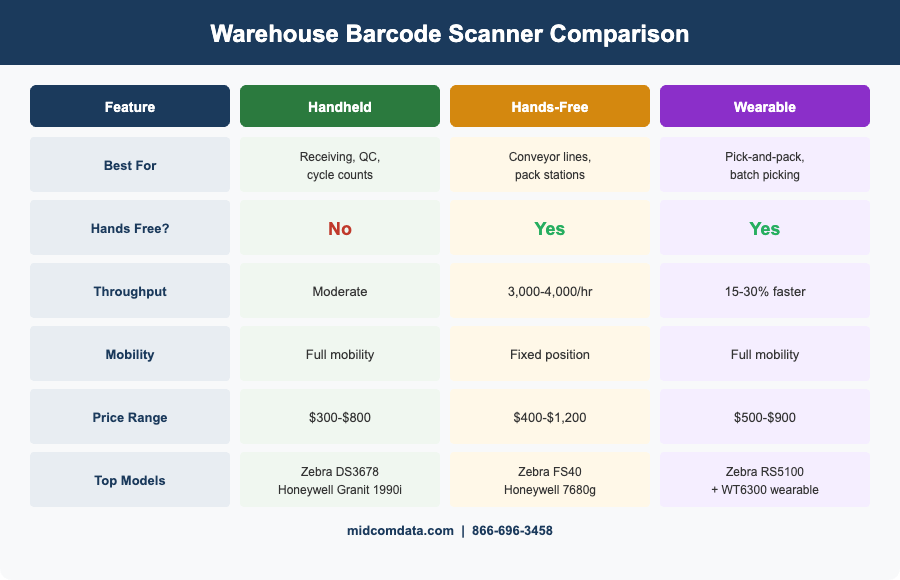
Handheld scanners are the most common type in warehouse environments. A worker picks up the scanner, points it at a barcode, pulls the trigger, and sets it back down. Models like the Zebra DS3678 and Honeywell Granit 1990iSR are built for industrial use with IP65 or IP67 ratings, meaning they handle dust, moisture, and repeated drops to concrete from six feet or more.
Handhelds work best in receiving docks, quality inspection stations, and any workflow where the operator scans items at varying distances and angles. The tradeoff is that one hand is always occupied, which slows down tasks that require two-handed manipulation of product.
Hands-Free (Fixed-Mount and Presentation) Scanners
Fixed-mount scanners like the Zebra FS40 sit in a permanent position and scan items as they pass by on a conveyor or as a worker presents them to the scan window. In high-throughput pack-and-ship stations, this setup eliminates the pick-up/put-down cycle entirely. A single fixed scanner on a conveyor line can process 3,000–4,000 scans per hour without any operator fatigue.
Presentation scanners — countertop units that read barcodes when held in front of them — are a good hybrid option for workstations where items arrive at irregular intervals.
Wearable (Ring and Glove) Scanners
Wearable scanners like the Zebra RS5100 ring scanner strap to a finger or the back of the hand. The worker triggers a scan with a finger tap, keeping both hands free to handle product. In pick-and-pack operations running wave or batch picking, wearables have been shown to improve pick rates by 15–30% compared to traditional handhelds because there is zero transition time between scanning and handling product.
Wearables pair with a mobile computer worn on the wrist or belt. They are ideal for operations that need maximum speed and already use voice-directed or display-directed picking workflows.
Key Specs That Matter at Scale
Once you have settled on a form factor, a few specs separate scanners that keep up from ones that slow you down.
Scan Speed and Decode Rate
Speed matters more than most buyers realize. Look for scanners with decode rates above 100 scans per second for 1D barcodes. For 2D barcodes (QR codes, Data Matrix, GS1 DataMatrix), the imager resolution matters more — a megapixel-class sensor like the one in the Honeywell Xenon XP 1952g handles damaged and poorly printed codes that cheaper sensors miss. In a facility processing tens of thousands of scans per shift, even a 2% first-pass failure rate adds up to hundreds of re-scans daily.
Scan Range
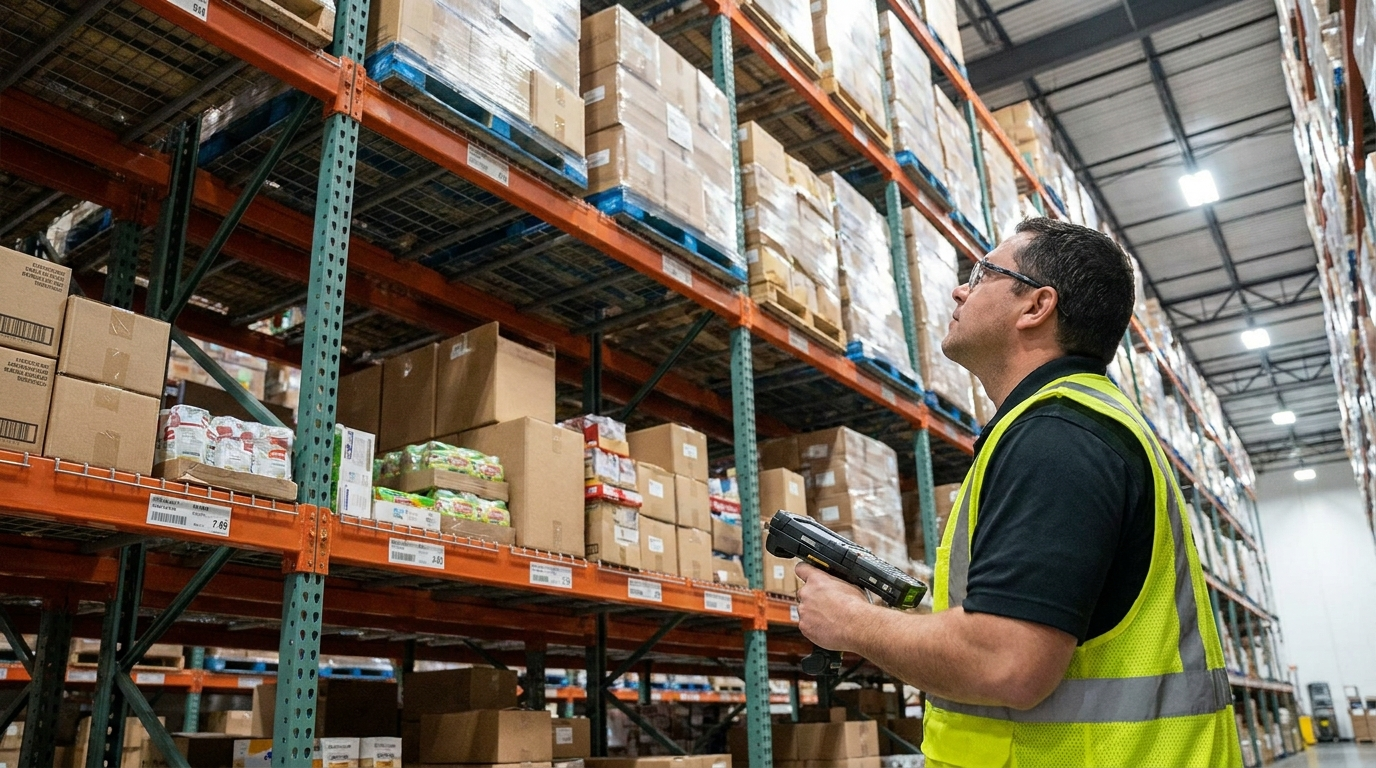
Standard-range scanners read barcodes from contact distance to about 18 inches. Extended-range models like the Zebra DS3678-ER can read a standard 100% UPC code from up to 70 feet away. If your workers scan rack labels at height on multi-level racking, an extended-range scanner eliminates the need for lifts or climbing, saving time and reducing injury risk.
Durability and IP Rating
Warehouses are hard on equipment. A scanner rated IP65 is protected against dust ingress and low-pressure water jets — fine for dry warehouses. IP67 models withstand temporary submersion, which matters in food processing or environments with regular washdowns. Drop specs matter too: industrial scanners should survive repeated 6-foot drops to concrete. The Zebra DS3678 is rated for 8-foot drops, which gives you some margin.
Battery Life
For cordless scanners, battery life needs to exceed a full shift — ideally 10–12 hours of continuous scanning — so workers are not swapping batteries mid-shift. Models with hot-swappable batteries let you exchange a depleted cell without powering down, keeping the scanner connected to your WMS the entire shift.
1D vs. 2D: Do You Need an Imager?
Traditional 1D laser scanners are cheaper, but they only read linear barcodes (UPC, Code 128, Code 39). If your operation uses any 2D codes — QR codes on inbound shipments, GS1 DataMatrix for pharmaceutical or food traceability, PDF417 on shipping labels — you need a 2D area imager.
Even if you only use 1D barcodes today, most operations are better off buying 2D imagers now. The price gap has narrowed significantly (often under $50 per unit), and you avoid a fleet-wide swap when a customer or compliance standard eventually requires 2D capability. Area imagers also read barcodes from any orientation, which speeds up scanning since workers do not need to align the barcode with a laser line.
Wireless vs. Tethered: Connectivity in Large Facilities
Tethered (corded) scanners are reliable and inexpensive, but they anchor a worker to a fixed station. In a warehouse where workers move between zones, cordless scanners connected via Bluetooth to a mobile computer or cradle base are the standard.
For facilities larger than 50,000 square feet, pay close attention to wireless range. Bluetooth Class 1 devices typically reach 300 feet line-of-sight. In a warehouse with steel racking, effective range drops significantly. Some operations use Wi-Fi-enabled scanners that connect directly to the network, but Bluetooth-to-mobile-computer is the more common and more reliable pairing in most warehouse environments.
If your facility is adopting Wi-Fi 6 (802.11ax), newer mobile computers and scanners designed for Wi-Fi 6 will benefit from lower latency and better performance in device-dense environments — important when dozens of devices share the same access points on a warehouse floor.
Matching Scanners to Warehouse Workflows
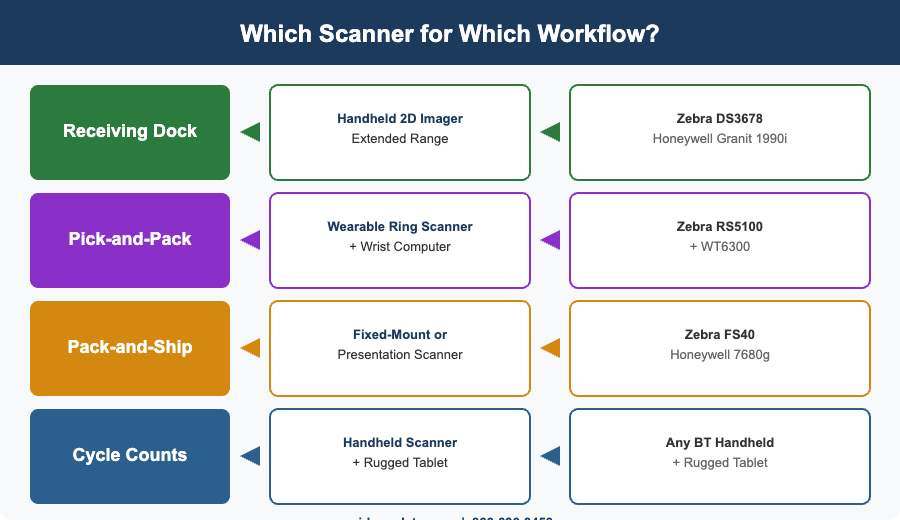
A quick reference for matching scanner type to common warehouse tasks:
Receiving dock: Handheld 2D imager with extended range. Workers scan pallet labels, case labels, and individual items at varying distances. The Zebra DS3678 or Honeywell Granit 1990iSR are solid choices here.
Pick-and-pack: Wearable ring scanner paired with a wrist-mounted mobile computer. Speed and hands-free operation are the priority. The Zebra RS5100 with a WT6300 wearable computer is a common pairing in high-throughput DCs.
Pack-and-ship station: Fixed-mount or presentation scanner. Items come to the worker, so a hands-free scan window reduces cycle time. The Zebra FS40 or Honeywell 7680g work well here.
Inventory cycle counts: Handheld scanner paired with a rugged mobile tablet for data entry and WMS access. The scanning needs are moderate, but the display and software integration matter more. MIDCOM’s rugged tablet lineup pairs well with Bluetooth handhelds for this workflow.
Planning Your Scanner Investment
Before you purchase, inventory your scanning touchpoints: every station, workflow, and environment where barcodes get read. Count the number of devices you need, factor in at least 10% spare units, and consider whether a single model can serve multiple roles or whether specialized scanners for specific workflows will pay for themselves in productivity gains.
Think about total cost of ownership, too. A $200 consumer-grade scanner that breaks every six months costs more over three years than a $500 industrial scanner backed by a service contract. And when a scanner does go down, MIDCOM’s repair centers get you back up fast — or you can take advantage of the barcode scanner buyback program to trade aging units toward new equipment.
Frequently Asked Questions
What type of barcode scanner is best for a large warehouse?
For most large warehouse operations, a cordless 2D area imager with industrial durability (IP65+ rating, 6-foot drop spec) is the best starting point. Wearable ring scanners are ideal for pick-and-pack workflows where hands-free operation improves speed, while fixed-mount scanners suit high-throughput conveyor lines.
How many barcode scanners do I need for my warehouse?
Map every scanning touchpoint in your operation — receiving, putaway, picking, packing, shipping, and cycle counts — and assign a scanner to each active station or mobile worker. Add 10% spare units to cover breakage, battery swaps, and seasonal volume spikes.
Should I buy 1D or 2D barcode scanners?
Buy 2D imagers. The price difference is now minimal (often under $50 per unit), and 2D imagers read both 1D and 2D codes from any angle. This future-proofs your operation for QR codes, GS1 DataMatrix, and any new barcode format your customers or compliance standards require.
How long do warehouse barcode scanners last?
Industrial-grade barcode scanners typically last 5–7 years in a warehouse environment when properly maintained. Scan windows, triggers, and batteries are the most common wear points. A service plan or access to a repair depot like MIDCOM’s can extend that lifespan further by keeping units in working order rather than replacing them prematurely.
Can I use the same barcode scanner for receiving and picking?
You can, but the ideal form factor often differs. Receiving benefits from a handheld with extended range for scanning pallet labels at distance, while picking workflows are faster with wearable ring scanners that keep both hands free. If budget is tight, a versatile handheld 2D imager like the Zebra DS3678 can handle both roles adequately.
Get Expert Help Choosing the Right Scanners
Every warehouse is different, and the right scanning setup depends on your layout, volume, and workflows. Browse MIDCOM’s full barcode scanner catalog or contact our team at 866-696-3458 for a recommendation based on your operation. MIDCOM has 40+ years in the industry and 3,000+ technicians across the U.S. and Canada who can help you pick the right hardware and keep it running.
Contact MIDCOM Data Technologies at 866-696-3458.