
Preventative Maintenance Schedule Thermal Label Printers
How to Set Up a Preventive Maintenance Schedule for Thermal Printers
Set up a preventive maintenance schedule for thermal printers
Thermal printer preventive maintenance is a structured routine of cleaning, inspection, and part replacement that keeps your print fleet running and avoids unplanned downtime. A well-executed schedule can extend printhead life by 50% or more and reduce emergency service calls by up to 40%, all while keeping label quality consistent across every shift. Below is what to do daily, weekly, monthly, and quarterly so you can build a program that fits your operation.
Why preventive maintenance pays for itself
Replacing a single printhead on a Zebra ZT610 runs between $400 and $700 depending on resolution. A full production stoppage while you wait for parts and a technician can cost far more than that in missed shipments and labor. Preventive maintenance attacks both problems at once. You catch wear before it becomes failure, and you keep consumable costs predictable instead of spiking every time something breaks.
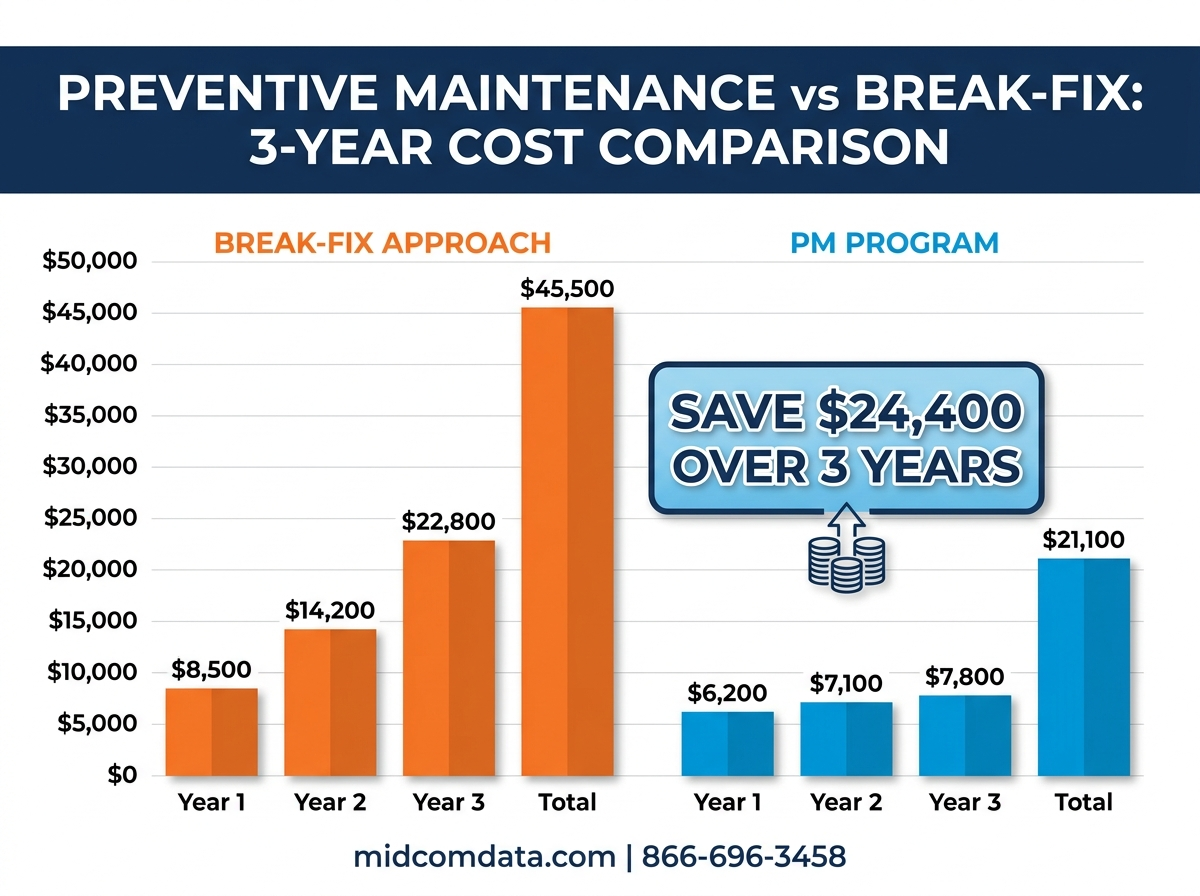
Fleet managers who maintain 20 or more printers typically see the math clearly. If unplanned printhead replacements drop from eight per year to three, and each replacement saves a half-day of downtime, you’re recovering both dollars and hours that go straight to throughput. The maintenance itself takes minutes per printer when it’s built into a routine.
Daily maintenance tasks
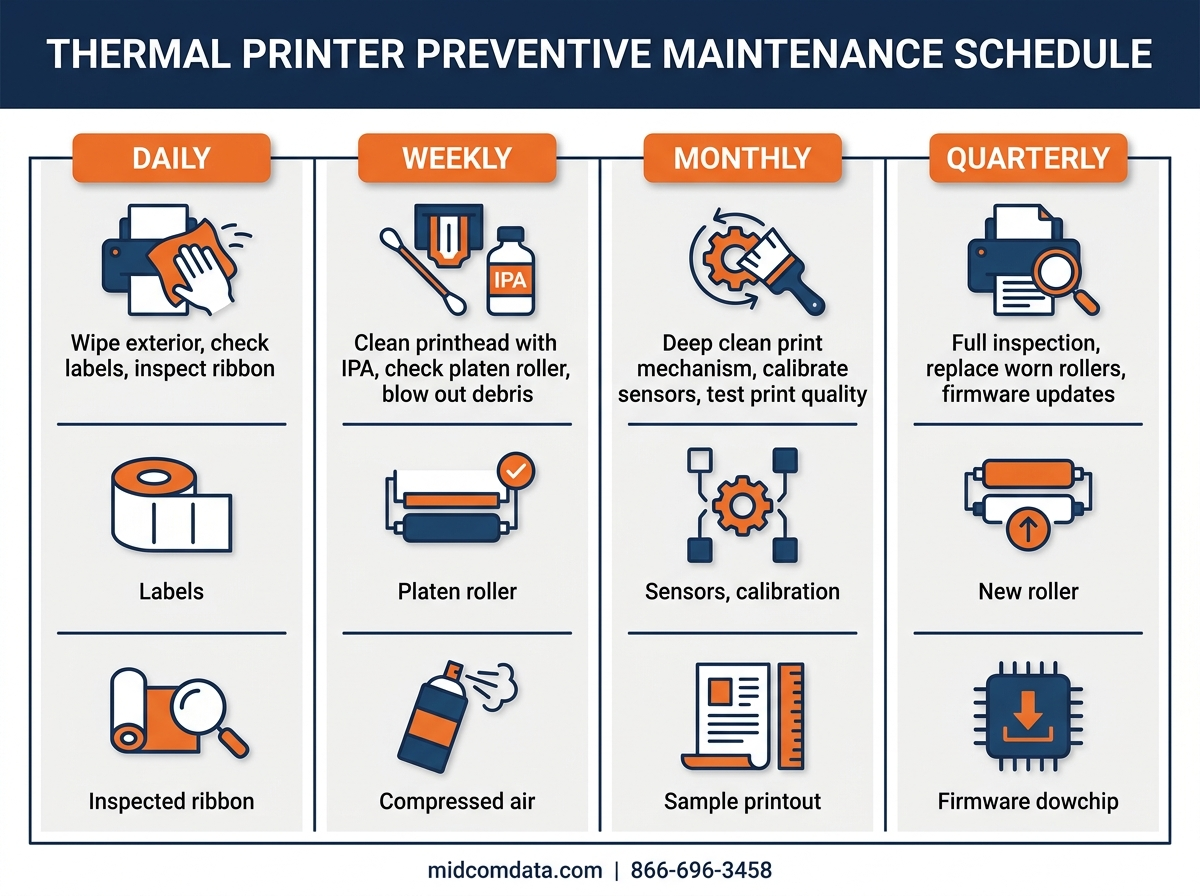
Daily tasks are fast. Budget about two minutes per printer at the start of each shift, and assign them to whoever loads media.
Visual inspection
Open the printhead assembly and look at the platen roller, media guides, and label path. You’re checking for adhesive buildup, torn label fragments, and dust. On direct thermal printers like the Zebra ZD421, adhesive residue builds up faster because there’s no ribbon layer between the media and the head.
Printhead wipe
Use an IPA (isopropyl alcohol) cleaning pen or a lint-free wipe with 99% IPA to clean the printhead surface. Wipe in one direction only, from one side to the other. Never scrub back and forth. This removes the fine layer of residue that accumulates with every label printed. On high-volume lines pushing 5,000+ labels per shift, this single step prevents the gradual darkening and streaking that leads to barcode scan failures.
Quick test print
Run a configuration label or a test pattern that includes a barcode. Scan it with a verifier or your standard scanner. If the barcode reads on the first pass, you’re good. If it takes multiple scans, you have a print quality issue developing that needs attention before it hits your production labels.
Weekly maintenance tasks
Weekly maintenance goes deeper than the daily wipe-down. Set aside 10 to 15 minutes per printer, and do it on a consistent day so it becomes routine rather than something that gets pushed off.
Platen roller cleaning
The platen roller is the rubber cylinder that presses media against the printhead. Rotate it manually while wiping it with an IPA-dampened cloth. You’re removing adhesive, dust, and paper fibers that embed in the rubber over time. A dirty platen roller causes uneven pressure across the print line, which shows up as faded sections on one side of the label. On the Honeywell PM45, the platen roller is easy to access and clean without tools.
Media path and sensor cleaning
Use compressed air (hold the can upright to avoid propellant spray) to blow out the media path, paying attention to the gap sensor and reflective sensor areas. Dust and label debris in the sensors cause media detection errors and registration problems, and the printer may cycle through multiple labels trying to find the gap or mark. A clean sensor reads accurately every time.
Exterior and vent cleaning
Wipe down the exterior housing and clear any dust from ventilation openings. In warehouse environments with high particulate levels, blocked vents cause internal temperatures to rise, which shortens the life of electronic components and can cause intermittent firmware errors.
Monthly maintenance tasks
Monthly tasks involve inspecting wear parts and verifying calibration. These take 20 to 30 minutes per printer.
Printhead inspection for wear
Examine the printhead element under good lighting or with a magnifying glass. Look for scratches, pitting, or dead dots. Dead dots show up on test prints as thin white lines running vertically through the printed image. A printhead with a few dead dots at the edge may still be usable, but dead dots in the barcode zone mean it’s time to order a replacement. MIDCOM Data Technologies stocks printheads for most major models, and our consumables catalog includes OEM and compatible options.
Darkness and speed calibration check
Print a test label and verify that darkness settings haven’t drifted. Over time, operators sometimes bump darkness up to compensate for a dirty printhead rather than cleaning it. This accelerates printhead wear. Reset darkness to the manufacturer’s recommended baseline and clean the head properly. On a Zebra ZT411 running at 6 inches per second, the factory default darkness setting of 20 is a reasonable starting point for most wax-resin ribbons.
Ribbon and media inventory check
Verify your supply levels against your consumption rate. Running out of the right ribbon mid-shift forces operators to either stop production or substitute a different ribbon, which usually means recalibrating darkness settings and risking print quality problems. Keeping a two-week buffer of your standard consumables prevents this disruption entirely.
Quarterly maintenance tasks
Quarterly maintenance is your deepest inspection cycle. This is where you assess parts that wear slowly and make replacement decisions before failures happen.
Platen roller condition assessment
Check the platen roller for glazing, flat spots, and loss of elasticity. Press a fingernail into the rubber surface. Healthy rubber shows a clean indent that bounces back right away. Glazed or hardened rubber feels slick and won’t indent properly. A worn platen roller on a Zebra ZT610 or Honeywell PM45 is a $50 to $150 part, and replacing it before it fails avoids the print quality problems that come from uneven media pressure.
Printhead pressure and balance
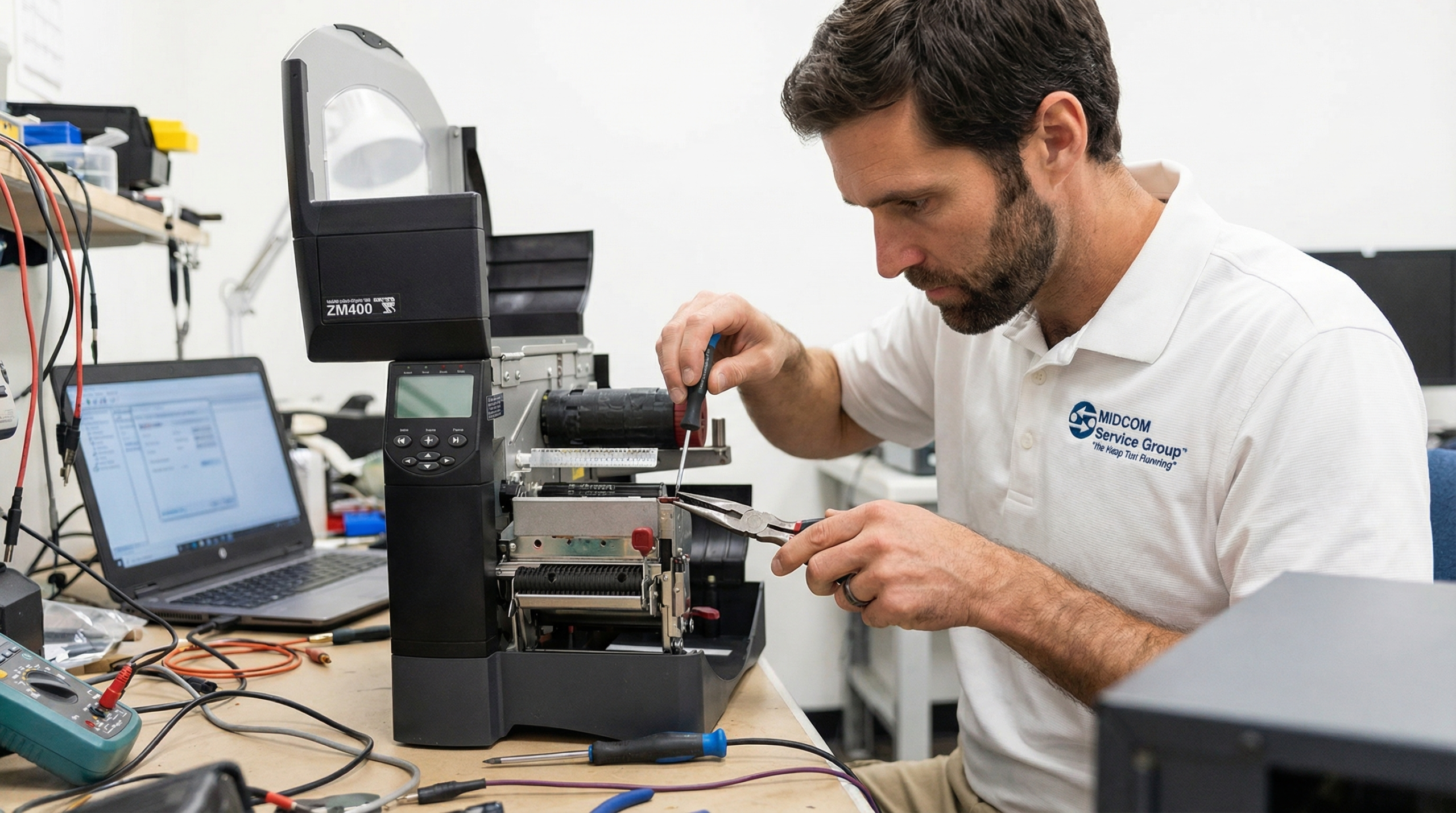
Verify that the printhead pressure is balanced from side to side. Most industrial printers have adjustable pressure toggles or dials on both sides of the printhead assembly. Uneven pressure causes one side of the label to print darker than the other. Check your printer’s service manual for the correct procedure. If you’re not comfortable adjusting printhead pressure yourself, MIDCOM’s on-site printer repair technicians can handle it during a scheduled visit.
Firmware and driver review
Check the manufacturer’s support site for firmware updates. Zebra, Honeywell, and SATO all release periodic firmware updates that fix bugs, improve print quality algorithms, and patch security vulnerabilities. Don’t update firmware in the middle of a production week. Schedule it for a planned maintenance window and test thoroughly before rolling updates across your entire fleet.
Full fleet performance review
Pull your service records for the quarter. Look at which printers had the most issues, which ones consumed the most printheads, and whether any units are approaching end-of-useful-life. Industrial thermal printers typically deliver 5 to 10 years of reliable service with proper maintenance, but a printer that’s eating a printhead every two months despite correct care may be signaling a deeper mechanical issue. If you’re seeing that pattern, it’s worth getting a diagnostic from a qualified technician or evaluating whether a replacement printer makes more financial sense.
Building the schedule into your operations
The maintenance itself is straightforward. The hard part is making it happen consistently. These approaches work well across large fleets.
Assign ownership. Each printer should have a designated person responsible for daily and weekly tasks. In a warehouse with 30 printers across three shifts, that might mean six people each covering five printers. Post a laminated checklist at each printer station so the process is visible and trackable.
Use your existing systems. If you run a CMMS (computerized maintenance management system) for other equipment, add your printers to it. If you don’t have a CMMS, a shared spreadsheet with dates, tasks, and sign-offs works fine for fleets under 50 units. The goal is a record you can reference when something goes wrong.
Stock the right supplies. Every maintenance station needs IPA cleaning pens, lint-free wipes, compressed air, and a cleaning card kit. Ordering these in bulk from your consumables supplier keeps per-unit costs low. MIDCOM Data Technologies carries cleaning kits and supplies alongside our full consumables inventory.
When to call in professional service
Preventive maintenance handles the routine work. But some issues need a trained technician with diagnostic tools and OEM parts: persistent barcode verification failures after cleaning, mechanical grinding or clicking noises, intermittent connectivity drops, and printhead replacement on high-resolution (600 DPI) models.
MIDCOM Data Technologies has over 40 years of experience and a network of more than 3,000 technicians across the United States and Canada. Whether you need a single repair visit or a service contract covering your entire fleet, we can match the level of support to your operation. Call us at 866-696-3458 or reach out through our contact page to set up a maintenance plan that keeps your printers running and your shipments moving on time.
Frequently asked questions
How often should you clean a thermal printhead?
Clean the printhead with a 99% isopropyl alcohol pen or lint-free wipe at the start of every shift or after every roll of media, whichever comes first. High-volume environments printing more than 5,000 labels per shift may benefit from cleaning twice per shift. Consistent daily cleaning is the single most effective step in any thermal printer preventive maintenance program.
How long does a thermal printhead last with regular maintenance?
A well-maintained thermal transfer printhead typically lasts 1 to 2 million linear inches of print. Direct thermal printheads generally last 500,000 to 1 million linear inches because the media is more abrasive. Without regular cleaning, those numbers can drop by 50% or more. On an industrial printer like the Zebra ZT610 running 8 hours a day, a properly maintained printhead can last 12 to 18 months.
What causes streaks and voids on thermal printer labels?
Streaks and voids are usually caused by debris on the printhead, dead heating elements (burned-out dots), or a worn platen roller creating uneven pressure. Start by cleaning the printhead and platen roller. If the streaks persist in the same location after cleaning, run a printhead test pattern to check for dead dots. Persistent voids that move position with each label usually point to a platen roller issue rather than a printhead problem.
Can you use regular rubbing alcohol to clean a thermal printhead?
Use 99% isopropyl alcohol only. Standard rubbing alcohol from a pharmacy is typically 70% IPA with 30% water, and that water content can leave mineral deposits on the printhead surface that cause print quality problems. Dedicated printhead cleaning pens from your printer manufacturer or consumables supplier contain the correct concentration and are the safest option.
How much does thermal printer preventive maintenance cost compared to reactive repairs?
The consumables for preventive maintenance (cleaning pens, wipes, compressed air) cost roughly $2 to $5 per printer per month. A single emergency printhead replacement costs $200 to $700 for the part alone, plus technician labor and production downtime. Fleet managers who follow a structured preventive maintenance schedule typically report 30% to 40% lower annual repair costs and far fewer unplanned outages.
To learn more about preventative maintenance for your thermal label printers, contact MIDCOM Data Technologies at (800) 643-2664 or fill out the form below. We are here to help!