
Barcode Data Quality: Check Digits, Duplicate SKUs, and Bad Scans
When the scan works and the data is still wrong
Barcode data quality problems are the ones that don’t announce themselves. The scanner beeps, the operator moves on, and the wrong SKU lands in inventory — because the barcode scanned correctly but encoded the wrong thing, or the scanner truncated it, or two products in your catalog share a number. These failures are worse than a no-read, because a no-read stops someone and a bad read doesn’t.
Check digits: the math that catches misreads
A check digit is an extra character calculated from the other characters in the barcode. The scanner recomputes it on every read and rejects the scan if it doesn’t match. It’s the reason a partially obscured UPC almost never produces a plausible-but-wrong number.
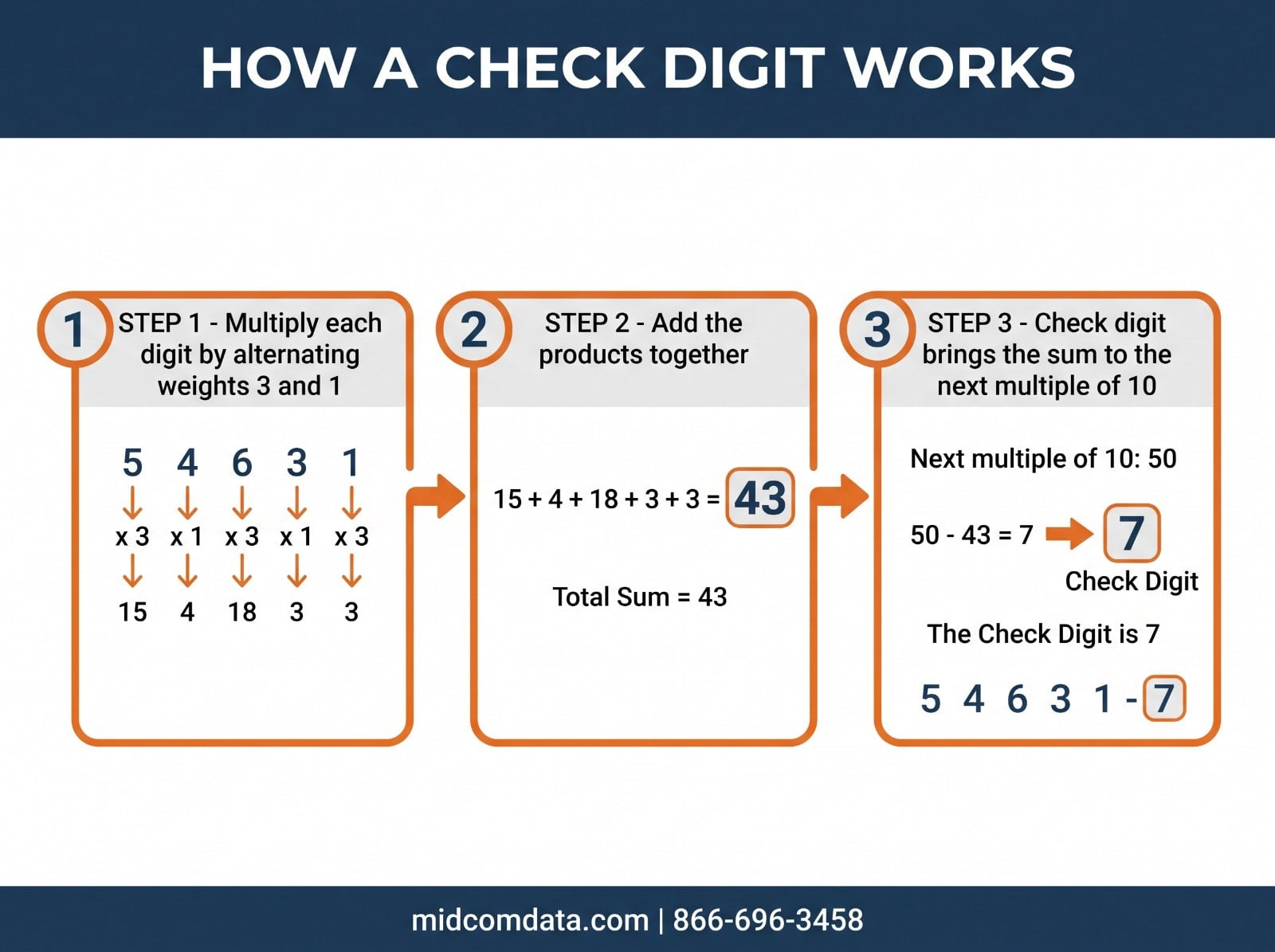
How UPC and EAN check digits work
UPC-A and EAN-13 use a modulo 10 calculation with alternating weights of 3 and 1. Each digit is multiplied by its weight, the products are summed, and the check digit is whatever value brings that sum up to the next multiple of 10.
The practical consequence: a single transposed digit almost always breaks the checksum, so the scan fails rather than reading as a different real product. That’s the whole point — the failure mode is a rejected scan instead of silent corruption.
Code 128 and GS1-128
Code 128 uses a weighted modulo 103 checksum. The start character’s value seeds the running total, each subsequent character is multiplied by its position weight, and the sum modulo 103 gives the check character. It’s built into the symbology and calculated by the encoder, so it isn’t something you enter — but it is something a poorly written label template can get wrong if it’s generating barcode data as raw text rather than through a proper encoder.
Code 39 and the optional check digit
Code 39 has an optional modulo 43 check digit that is frequently left off, because it’s optional and adds a character. If you’re using Code 39 for anything where a misread has consequences, turn it on. Both the encoder and the scanner need it enabled — enabling it on only one side means every scan fails or the check digit appears in your data as a stray character.
The duplicate SKU problem
Duplicate identifiers are the most common data quality failure in operations that have grown by acquisition, added channels, or migrated systems.
It happens several ways. Two suppliers ship products that carry the same internal part number. A product is discontinued and its SKU is reused years later. An acquired company’s catalog merges into yours with colliding numbers. Or the same physical item exists twice under different SKUs because two buyers set it up independently — the mirror-image problem, and harder to detect.
The symptom is inventory that won’t reconcile no matter how many cycle counts you run. One location shows stock that isn’t there because two items are sharing a record.
Prevention is a governance question more than a technology one. Someone has to own SKU creation, numbers must never be reused, and a merge or migration needs a collision check before cutover rather than after. If you’re setting up a new system, our guide on setting up a barcode system from scratch covers planning identifiers before hardware.
Scanner configuration that corrupts data
A correctly printed barcode can still deliver wrong data because of how the scanner is configured. These are worth checking first when data looks wrong, because they’re fast to rule out.
Truncation settings
Most scanners can be configured to strip leading or trailing characters. This gets enabled for a legitimate reason — trimming a prefix some system adds — and then applies to every symbology, quietly cutting characters off barcodes it was never meant to touch. If your scanned data is consistently short by the same number of characters, look here.
Length limits by symbology
Scanners often have minimum and maximum length settings per symbology, sometimes to reduce misreads. A scanner configured to accept Code 128 between 8 and 12 characters will silently ignore a 14-character barcode, which presents to the operator as a no-read on a perfectly good label.
Symbology enabled but misconfigured
Code 39 with the check digit transmitted when the host doesn’t expect it adds a character to every scan. UPC-E expansion to UPC-A being on or off changes the length and value of what’s transmitted. Both are set-once configurations that cause consistent, easily misdiagnosed corruption.
Prefix and suffix characters
A carriage return suffix is normal and usually necessary. Problems come when a scanner is reconfigured for one application and keeps settings that break another — an added tab character that a new system interprets as a field delimiter, for instance.
When scanners across a site behave inconsistently, the usual cause is that they were configured individually over time rather than from a single profile. MIDCOM Data Technologies can audit scanner configurations and standardize them across your fleet. Call 866-696-3458 or request support.
Symbology choice and data integrity
Different symbologies offer different protection, and the choice matters more for data quality than most people assume.
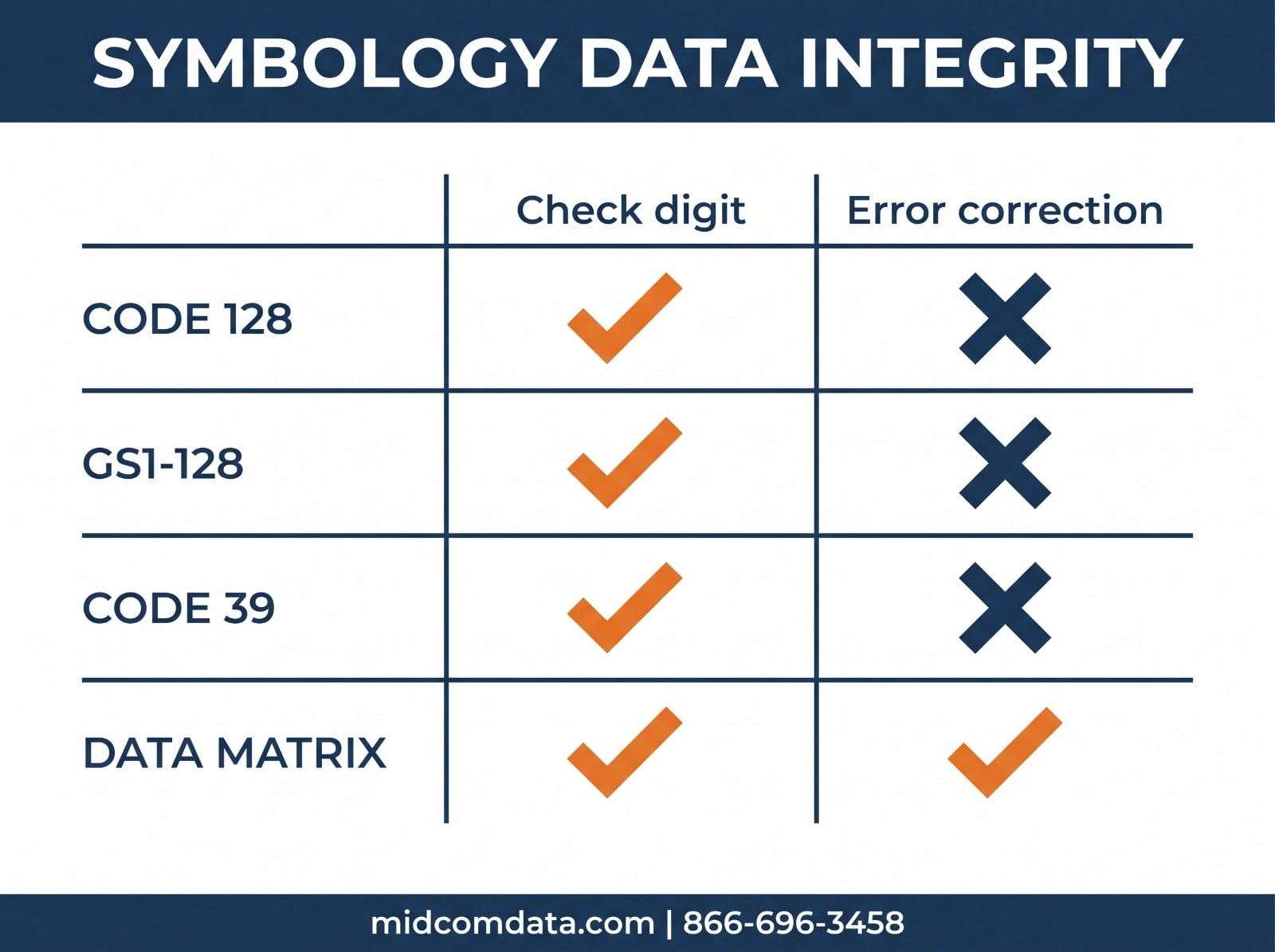
Code 128 has a mandatory check character, encodes the full ASCII set, and is compact. It’s the default recommendation for internal warehouse data for good reason.
GS1-128 adds Application Identifiers, which label each data element — lot number, expiration date, serial number, weight. That’s a data quality feature in itself: the receiving system knows what each field is rather than parsing a fixed-position string and hoping the format never changes.
Code 39 is older, less dense, and has only an optional check digit. It persists because it’s simple and widely supported, but for new deployments Code 128 is the better choice.
Data Matrix includes Reed-Solomon error correction, meaning a damaged symbol can still decode correctly rather than failing — genuinely valuable for labels that get abraded or partially obscured. It needs a 2D imager to read.
Auditing your barcode data
Most operations discover data quality problems through symptoms rather than inspection. A periodic audit finds them earlier.
Start by querying your item master for duplicate identifiers — the same barcode value on more than one item record. This is a five-minute query and it finds real problems surprisingly often.
Then look for the inverse: multiple SKUs that appear to be the same physical item. Matching on description and supplier part number catches most of these, though it takes judgment to confirm.
Check field lengths for consistency. If a field should hold 12-character GTINs and you have records with 11 or 13, something upstream is adding or trimming characters.
Finally, scan a sample of real labels from each printer and compare what arrives in the system against what should have been encoded. This is the check that catches scanner configuration problems, because it tests the whole path rather than just the data at rest.
If scan data isn’t matching what your labels should contain and you can’t isolate whether it’s the printer, the scanner config, or the data itself, MIDCOM Data Technologies can help trace it. We service barcode hardware at over 3,000 locations across the U.S. and Canada. Request a quote or call 866-696-3458.
Frequently asked questions
What is a barcode check digit and why does it matter?
A check digit is an extra character calculated from the barcode’s other characters. The scanner recalculates it on every read and rejects the scan if it doesn’t match, which catches misreads before they become bad data. UPC-A and EAN-13 use a modulo 10 calculation with alternating weights of 3 and 1; Code 128 uses a weighted modulo 103 checksum built into the symbology.
Why does my scanner cut off characters from barcodes?
Almost always a scanner configuration setting. Truncation options that strip leading or trailing characters get enabled for one application and then apply to every symbology. Per-symbology minimum and maximum length limits can also cause a valid barcode to be ignored entirely, which looks like a no-read rather than a configuration problem.
How do duplicate SKUs happen and how do I find them?
They come from reusing retired part numbers, merging catalogs after an acquisition, or two people setting up the same item independently. Find them by querying your item master for the same barcode value on multiple records, then for multiple SKUs matching on description and supplier part number, which catches the harder case of one physical item existing twice.
Which barcode symbology is best for data integrity?
Code 128 for general internal use — it has a mandatory check character and encodes full ASCII compactly. GS1-128 when you need labeled data fields like lot or expiration, since Application Identifiers remove parsing ambiguity. Data Matrix when labels get damaged, because its Reed-Solomon error correction lets a partially damaged symbol still decode correctly.
Should I enable the Code 39 check digit?
Yes, for any application where a misread has consequences — Code 39’s modulo 43 check digit is optional and commonly left off. Enable it on both the encoder and the scanner. Turning it on in only one place causes every scan to fail, or leaves the check digit appearing in your data as an extra character.