
Barcode Scanner Spec Sheet
How to Read a Barcode Scanner Spec Sheet (Without Getting Lost)
How to Read a Barcode Scanner Spec Sheet
A barcode scanner specifications guide translates the dense technical tables on manufacturer spec sheets into practical buying decisions. Zebra and Honeywell pack dozens of numbers onto a single page, and if you don’t know which ones to pay attention to, you’ll either overspend on features you don’t need or miss a spec that bites you six months later. This article covers what each spec category means and how to compare models so you pick the right scanner for your warehouse.
Scan engine type: 1D vs. 2D imagers
The scan engine determines what types of barcodes your scanner can read. It’s the first thing to check because everything else on the spec sheet is irrelevant if the engine can’t handle your labels.
Linear (1D) scan engines
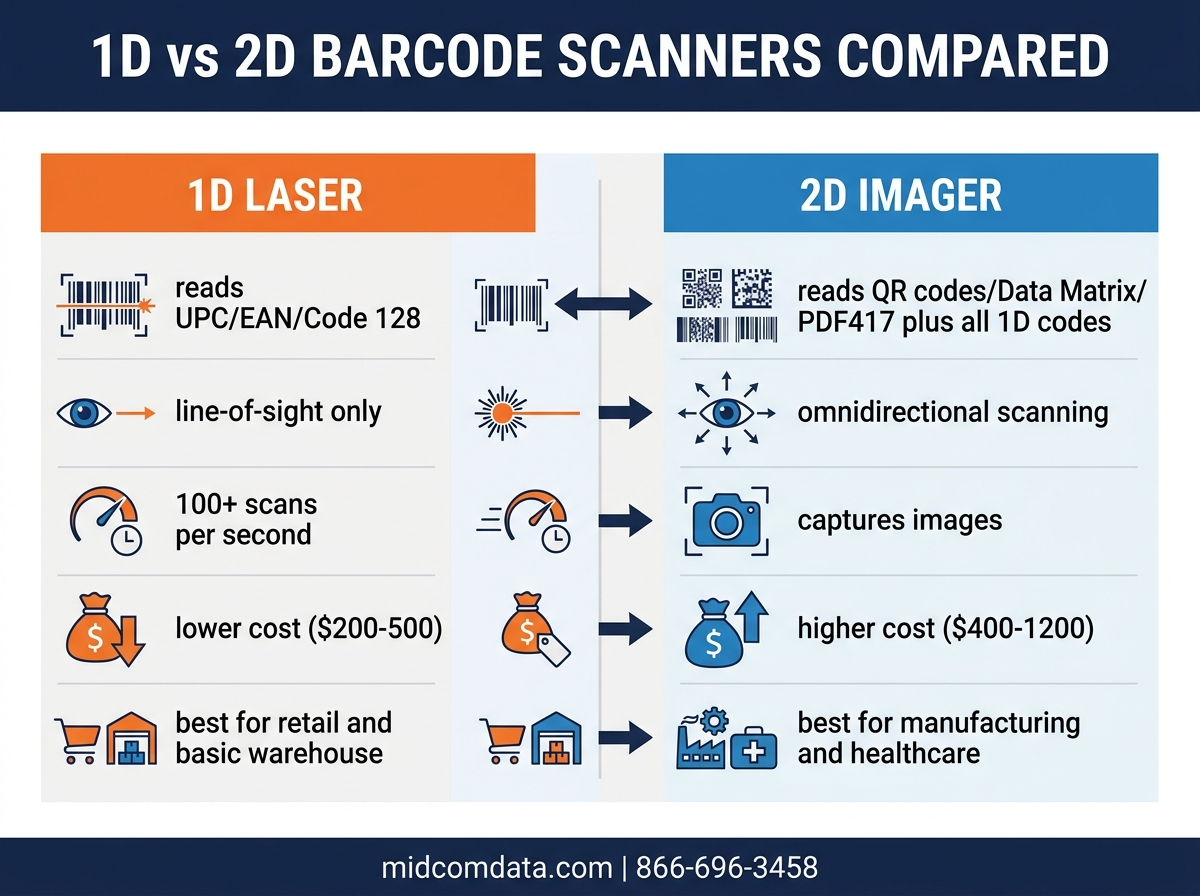
Linear scanners read traditional one-dimensional barcodes: UPC, Code 128, Code 39, Interleaved 2 of 5. They project a single red line across the barcode. The Zebra LI3608 is a good example. It uses a linear imager (not a laser) that reads standard 1D symbologies at distances up to 56 feet on large retro-reflective labels. If your warehouse only handles standard shipping labels and UPC codes, a 1D scanner costs less and gets the job done.
2D area imagers
A 2D imager captures a full picture of whatever it’s pointed at. It reads QR codes, Data Matrix, PDF417 (the kind on your driver’s license), and every 1D symbology too. The Zebra DS3678 and Honeywell Granit 1981i both use 2D megapixel imagers. The practical advantage is that 2D imagers read damaged or poorly printed labels more reliably because they capture the entire barcode image and use software to reconstruct partial data. They also read barcodes from phone screens, which keeps mattering more as digital BOLs and mobile inventory apps spread through supply chains.
If you’re buying scanners today for a warehouse that plans to operate for the next five to seven years, go with 2D. The price gap has narrowed, and you avoid the scenario where your entire fleet can’t read a new label format that a trading partner starts requiring next year.
Scan rate and decode speed
Scan rate tells you how many decode attempts the scanner makes per second. Higher means faster reads, especially on moving conveyors or when workers are scanning rapidly during picking runs.
The Zebra DS3678 processes up to 487 scans per second on 1D barcodes. The Honeywell Granit 1981i hits 1,120 scans per second. That sounds like a huge difference on paper, but real-world performance depends on more than raw scan rate. Decode algorithms and motion blur handling both factor in, and a scanner with a lower scan rate but better motion tolerance can outperform a “faster” scanner on a high-speed conveyor.
Watch out for this: manufacturers sometimes list the scan rate for ideal conditions (perfect label, optimal distance, no ambient light interference). Ask for performance data at your actual operating distances and speeds. If you’re scanning boxes on a belt moving 300 feet per minute, that’s the test that counts.
Scan range (working distance)
Scan range is how close and how far the scanner can read a barcode. This spec is always tied to barcode size and density, so a single “range” number without context is meaningless.
The Zebra DS3678-SR (standard range) reads a 20-mil Code 128 barcode from contact distance out to about 26 inches. The DS3678-HD (high density) variant reads smaller barcodes at closer range but can’t reach as far. The DS3678-ER reads a 100-mil barcode out to 70 feet. Same scanner family, completely different range profiles.
For a typical warehouse operation with rack scanning, you want a model that reads standard shipping labels (15-20 mil) at 3 to 5 feet comfortably. If your workers scan pallets on high racks from the floor, you need an extended-range model. Match the spec sheet’s range data to the actual barcode sizes and scan distances in your facility. If you’re not sure which range profile fits, talk to a scanner specialist who can help you figure it out.
IP rating: dust and water protection
The IP (Ingress Protection) rating is a two-digit code. The first digit rates dust protection on a scale from 0 to 6, and the second rates water protection from 0 to 9. Higher is better in both positions.
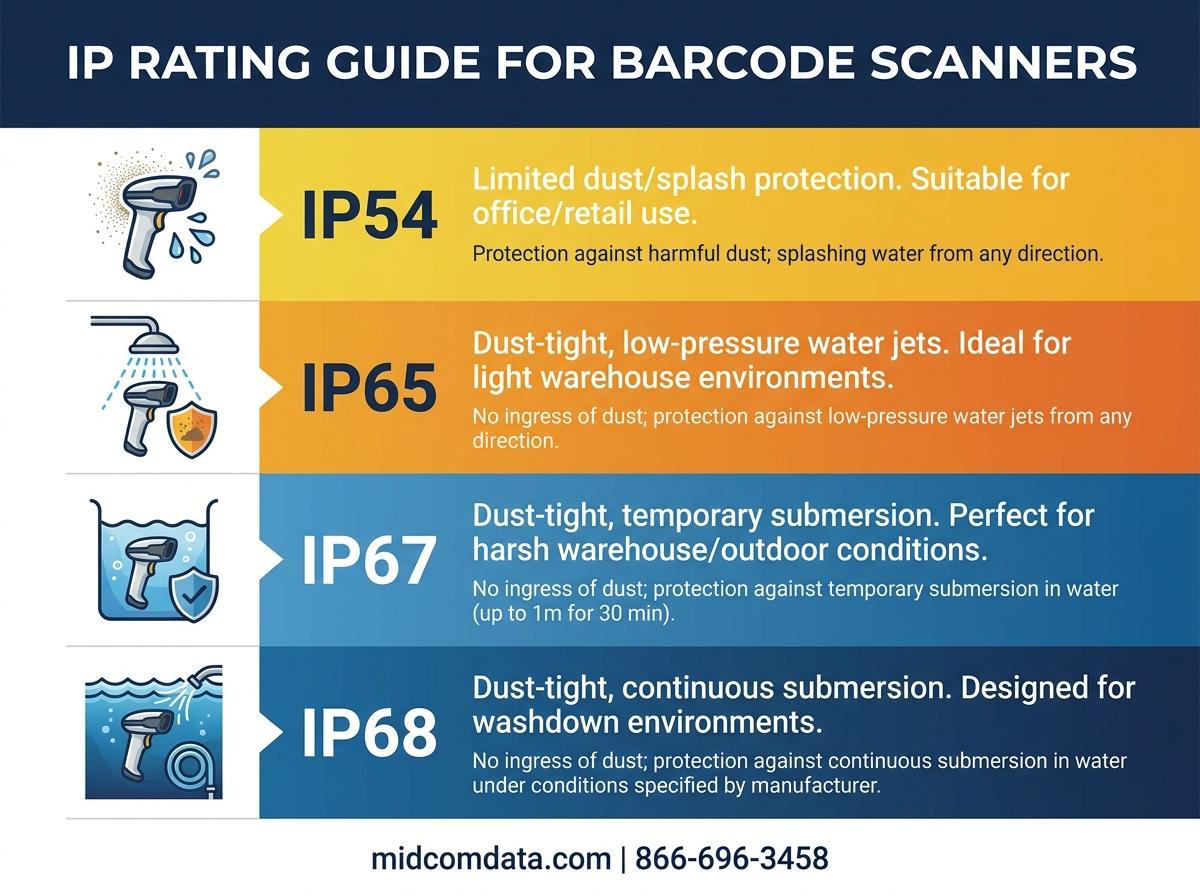
Warehouse scanners should carry at least IP65, which means complete dust protection (6) and protection against low-pressure water jets (5). The Zebra DS3678 is rated IP67, so it survives temporary submersion in water up to 1 meter for 30 minutes. The Honeywell Granit 1981i also carries IP67. If your facility includes cold storage, outdoor loading docks, or wash-down areas, IP67 is the minimum worth considering.
Watch out for scanners rated IP54 or lower being marketed as “rugged.” IP54 means dust can get in (just not enough to affect operation, supposedly) and it only handles splashing water. That’s a retail scanner, not a warehouse scanner.
Drop spec and tumble spec
Drop specs tell you how far a scanner can fall onto concrete before it breaks. Tumble specs measure endurance against repeated low-impact drops inside a rotating drum.
The Zebra DS3678 and LI3608 are both rated for drops from 8 feet (2.4 meters) to concrete. The Honeywell Granit 1981i handles drops from 6.5 feet (2 meters). These ratings come from controlled lab tests at room temperature on a specific surface, so real-world drops onto cold concrete at odd angles will be harder on the device.
Tumble spec often tells you more about long-term durability. The Granit 1981i withstands 5,000 tumbles at 3.3 feet (1 meter), simulating the accumulated abuse of daily use. Most scanner damage comes from repeated small impacts, not one dramatic fall off a forklift. A high tumble rating is worth paying attention to.
When scanners do break from impact damage, professional depot repair is almost always cheaper than buying a replacement, especially for rugged models that cost $500 or more.
Light source type
Spec sheets list the light source used for illumination and aiming. You’ll see visible red LEDs, white LEDs, and laser aimers.
Laser aimers project a visible red line or dot that helps the operator target the barcode. LED illumination floods the barcode with light so the imager can capture a clear picture. Some models, like the Zebra DS3678, use both: a laser aimer for targeting plus LEDs for illumination. Others use only LEDs for both functions.
For warehouse work, the aiming pattern matters more than the light source technology. A bright, visible aiming dot helps in dark aisles and on high shelves. If your workers scan in direct sunlight on loading docks, look for models with green LED aimers rather than red. Green is easier to spot in bright conditions.
Interface and connectivity
How the scanner talks to your host system affects deployment complexity and daily workflow. The options vary between models, and picking the wrong interface can create headaches down the road.
Wired interfaces
USB (both HID keyboard emulation and native USB communication), RS-232 serial, and keyboard wedge are the common wired options. USB HID is the simplest. The scanner acts like a keyboard and types the barcode data into whatever field has cursor focus. No drivers, no special software. RS-232 gives more control over data formatting but requires serial port configuration.
Wireless protocols
Bluetooth Classic and Bluetooth Low Energy (BLE) are standard for cordless models. The Zebra DS3678 and Honeywell Granit 1981i both support Bluetooth Classic, connecting to cradle-mounted radios or directly to mobile computers. Some models support Bluetooth 5.0 for faster pairing and more stable connections.
Wireless range is typically rated at 300 feet line of sight for Bluetooth models, but metal shelving, concrete walls, and RF interference from other warehouse equipment cut that number fast. Expect 100 to 150 feet of reliable range in a real warehouse environment.
Wi-Fi-enabled scanners are less common in handheld form factors but do exist for situations where data needs to reach a central server without a paired mobile computer. Check whether your WMS supports direct scanner communication or requires middleware.
Weight and ergonomics
Weight matters more than most spec sheet shoppers realize. The Zebra DS3678 weighs 12.3 ounces without the battery. The Honeywell Granit 1981i comes in at about 12.7 ounces with its battery. That difference sounds small, but after eight hours of continuous use, even a couple ounces changes how your workers’ wrists feel at the end of a shift.
Balance point and grip design also affect fatigue. A front-heavy scanner wears on the wrist faster than one with the weight centered over the handle. Trigger force is another ergonomic spec that’s sometimes listed, and a lighter trigger pull does reduce finger strain during high-volume scanning.
If your picking staff scan 800 to 1,200 times per shift, these specs have a direct effect on injury rates and throughput. Request demo units before committing to a bulk purchase. Ten minutes with a scanner in hand tells you more than any spec sheet will.
Decode capability: supported symbologies
The symbology list tells you which barcode formats the scanner can read. Most modern 2D imagers support 30 or more symbology types, but the list that matters for warehouse operations is shorter.
Standard warehouse symbologies include Code 128 (used on GS1-128 shipping labels), Code 39, Interleaved 2 of 5, UPC-A, UPC-E, EAN-13, and EAN-8. If you handle healthcare products, you need GS1 DataBar. For compliance labeling or lot tracking, Data Matrix and QR Code support is becoming a requirement rather than a bonus.
The spec to look at carefully is not whether a symbology is “supported” but whether it’s supported well. Some scanners technically decode Data Matrix but do it slowly or unreliably on small, high-density marks. If a specific symbology is critical for your operation, test it with your actual labels before buying.
MIDCOM Data Technologies maintains a full barcode scanner catalog with spec comparisons across Zebra, Honeywell, and other major manufacturers if you want to compare models side by side.
Marketing fluff vs. specs that matter
Spec sheets include numbers that sound impressive but rarely affect how the scanner performs on your floor.
You can mostly skim past maximum theoretical scan rate under lab conditions, maximum Bluetooth range (line of sight, no obstacles), supported character sets beyond your region’s standard, and operating temperature ranges (unless you work in extreme cold or heat).
Spend your time on IP rating, drop spec (height and surface type), decode speed at your actual working distance, supported symbologies for your specific labels, battery life under continuous scanning (not standby time), and warranty terms.
Battery life deserves a closer look. Manufacturers often list standby time (days or weeks) right alongside active scan time (hours). A scanner rated for 60,000 scans per charge sounds generous, but if your staff performs 1,200 scans per shift and battery degradation cuts capacity by 20% after a year, you’ll be dealing with mid-shift charging sooner than you planned.
Making the final decision
Start by writing down your actual requirements: what barcode types you scan, at what distances, in what conditions, how many scans per shift, and what host systems the scanners connect to. Then filter spec sheets against that list. A scanner that exceeds every requirement isn’t a better buy. It’s an unnecessary expense.
If your current scanners are aging out, MIDCOM Data Technologies can help. Our scanner buyback program gives you trade-in value on old equipment. Our service contracts cover your new scanners against the inevitable drops, spills, and general warehouse wear. With over 3,000 technicians across the United States and Canada and more than 40 years in the business, MIDCOM has the field coverage to support your equipment wherever your facilities are. Call us at 866-696-3458 or fill out the form below.
Frequently asked questions
What does IP67 mean on a barcode scanner?
IP67 means the scanner is completely sealed against dust (rated 6 out of 6) and can survive temporary submersion in water up to 1 meter deep for 30 minutes (rated 7 out of 9). For warehouse use, IP67 is the standard rating on rugged industrial scanners. The Zebra DS3678 and Honeywell Granit 1981i both carry this rating.
Should I buy a 1D or 2D barcode scanner for warehouse use?
A 2D imager is the better investment for most warehouses. 2D scanners read every barcode type that 1D scanners read, plus QR codes, Data Matrix, and barcodes on phone screens. The price difference between 1D and 2D models has narrowed enough that going with 2D avoids the risk of a full scanner replacement if your trading partners adopt new label formats.
How far can a warehouse barcode scanner read?
Standard-range warehouse scanners like the Zebra DS3678-SR read typical 20-mil shipping barcodes from contact distance out to about 26 inches. Extended-range models like the DS3678-ER can read large retro-reflective labels at distances up to 70 feet. The effective range always depends on barcode size, density, and print quality.
What is a good drop spec for an industrial barcode scanner?
Industrial barcode scanners should survive repeated drops from at least 6 feet (1.8 meters) onto concrete. The Zebra DS3678 and LI3608 are rated for 8-foot drops. The Honeywell Granit 1981i handles 6.5-foot drops. Tumble specs (1,000 to 5,000 tumbles at 3.3 feet) matter just as much because they measure resistance to the cumulative smaller impacts of everyday use.
How long do barcode scanner batteries last per shift?
Most cordless industrial scanners deliver between 40,000 and 70,000 scans per battery charge. For a warehouse worker scanning 800 to 1,200 times per shift, a full charge typically lasts through an 8-hour shift with room to spare. Battery capacity degrades over time, though, so expect noticeable reduction after 12 to 18 months of daily use. Keeping spare charged batteries available avoids mid-shift downtime.