
Mobile Printing in the Warehouse: When and Why It Makes Sense
What mobile printing does that a fixed printer can’t
A mobile label printer is a belt-worn or shoulder-strapped thermal printer that produces labels at the point of application instead of at a fixed station. The value isn’t the printer — it’s eliminating the walk. In a receiving operation where workers currently carry cartons to a labeling station, print, and walk back, mobile printing removes that round trip entirely, which typically cuts labeling time per unit by 30 to 50%.
Where mobile printing pays off
Receiving and put-away
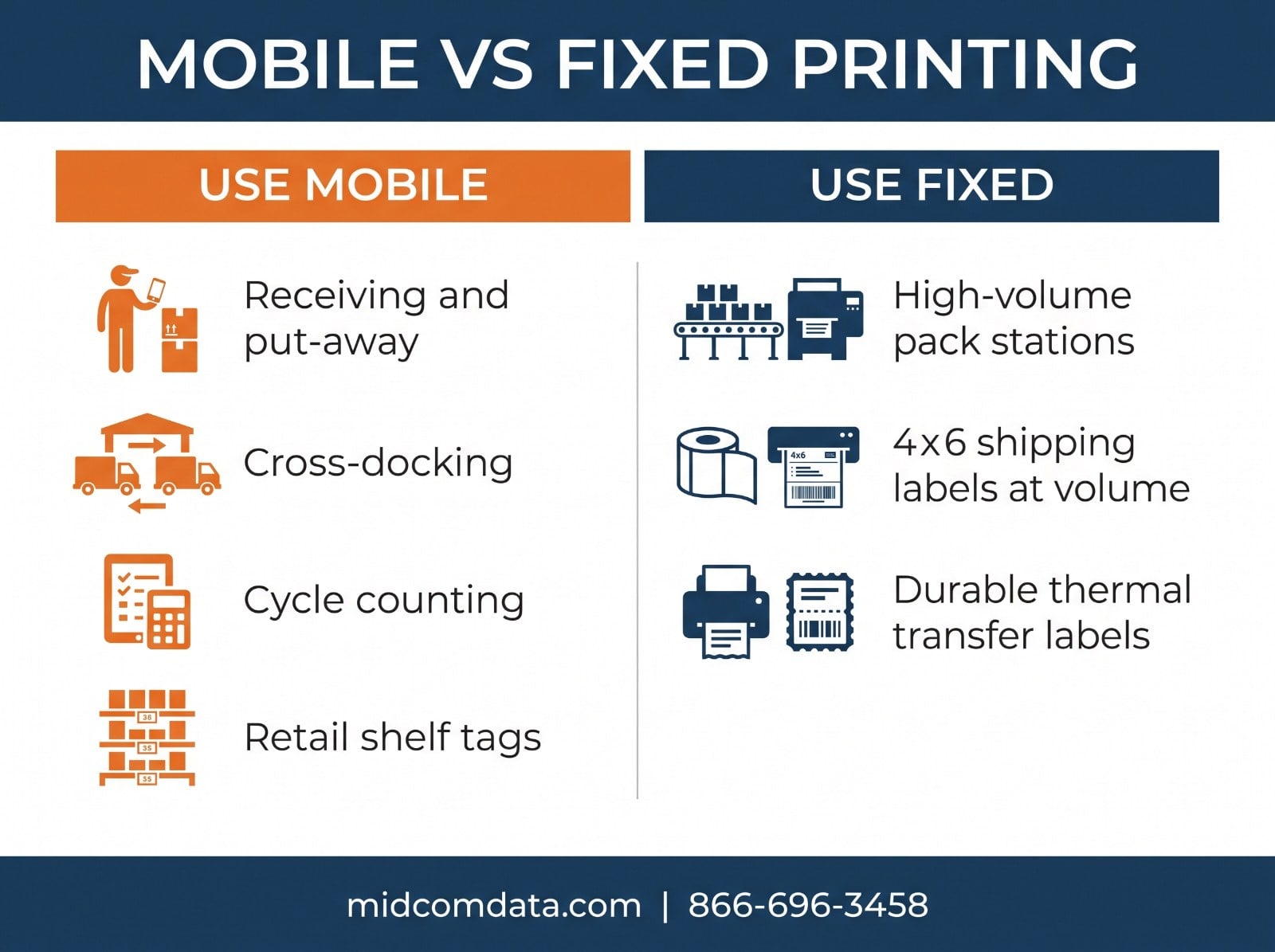
Receiving is where mobile printing earns its cost fastest. Inbound pallets arrive with supplier labels that don’t match your internal SKU scheme, so each carton needs a new label before put-away. With a fixed printer, that means staging the pallet near the printer, labeling everything, then moving it. With a mobile printer, the receiver scans the supplier barcode, the WMS returns the internal label, and it prints on the spot — one pass, no staging area.
Operations that switch typically report receiving throughput gains of 20 to 40%, mostly from eliminating pallet staging and double-handling.
Cross-docking
Cross-dock operations live and die on speed, and there’s often no room for a staging area near a printer. Mobile printing lets a worker relabel freight for outbound routing while it sits on the dock floor. The alternative is moving freight to a printer and back, which in a cross-dock is pure waste.
Cycle counting and inventory correction
When a counter finds a bin with a damaged or missing label, a mobile printer means fixing it immediately rather than writing down the location and coming back. Anyone who has managed a cycle count knows how many of those “come back later” items never get fixed.
Route delivery and field service
Drivers printing delivery receipts, proof-of-delivery labels, or DOT-required documentation at the vehicle. This is a common use for mobile receipt printers rather than label printers, but the hardware overlaps.
Retail backroom and shelf labeling
Price change labels and shelf tags printed in the aisle instead of the back office. For a store doing weekly price updates across hundreds of SKUs, the walk-back-to-the-printer time adds up fast.
Where mobile printing is the wrong choice
Mobile printers cost more per unit than desktop printers, print slower, hold less media, and need battery management. If your labeling happens at a fixed point anyway, none of the mobile advantages apply.
Don’t go mobile for a high-volume pack station. A pack line where cartons come to the operator on a conveyor is already the optimal arrangement — the work comes to a fixed point, so a fast industrial printer at that point is the right answer. A mobile printer would be slower and need constant media reloading.
Don’t go mobile for 4×6 shipping labels at volume. Most mobile printers max out at 4-inch media width and hold 2 to 3 inch diameter rolls, meaning 100 to 200 labels before a reload. A station printing 800 shipping labels a shift would reload a mobile printer six times.
Don’t go mobile if you need long-life durable labels. Most mobile printers are direct thermal only. If your labels need to survive heat, sunlight, chemicals, or more than a few months, you need thermal transfer, which generally means a fixed printer. Our guide on direct thermal vs. thermal transfer covers where that line falls.
What to look for in a mobile printer
Print width
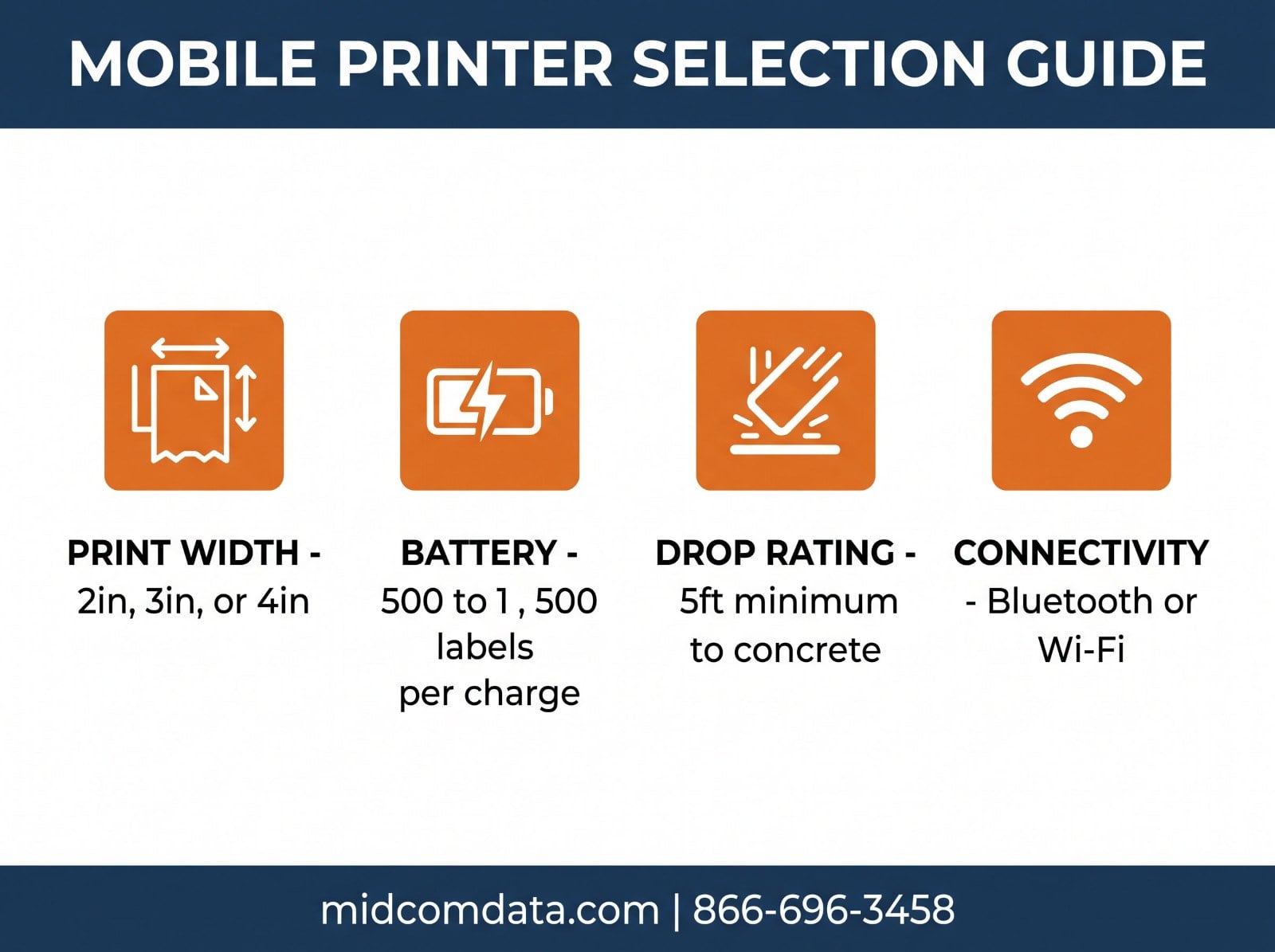
Mobile printers come in 2-inch, 3-inch, and 4-inch print widths. Two-inch models are the lightest and best for shelf tags, receipts, and small product labels. Three-inch handles most internal warehouse labels. Four-inch models like the Zebra ZQ630 print full shipping labels but weigh noticeably more, which matters when someone wears it for eight hours.
Pick the narrowest width that covers your labels. The weight difference between a 2-inch and 4-inch mobile printer is roughly double, and operators notice.
Battery runtime
Mobile printer batteries are rated in labels per charge rather than hours, since printing is what draws power. A typical 3-inch mobile printer delivers 500 to 1,500 labels per charge depending on label size and print darkness. Confirm the spec against your actual per-shift volume, and get a spare battery plus a multi-bay charger if you’re anywhere near the limit.
Drop and environmental rating
A printer worn on a belt gets dropped. Look for a minimum 5-foot drop-to-concrete spec for warehouse use, and check the IP rating — IP54 handles dust and light splashes, which covers most indoor warehouse work. For outdoor yard operations or wash-down areas, look for IP65 or higher.
Connectivity
Most mobile printers offer Bluetooth, Wi-Fi, or both. Bluetooth pairs to a handheld mobile computer and works anywhere the two are together, which is simpler and doesn’t depend on facility Wi-Fi coverage. Wi-Fi lets the printer receive jobs directly from the WMS but requires solid coverage everywhere the operator works — dead zones mean failed prints. For most warehouse applications, Bluetooth paired to a mobile computer is the more reliable setup.
Media and mounting
Check that the printer takes standard media sizes you can source easily, and that the roll capacity matches your reload tolerance. For mounting, most operations use a shoulder strap or belt clip; vehicle-mount cradles exist for forklift and delivery van applications and are worth it if the operator is mostly seated.
The cost comparison
Mobile printers run roughly $600 to $1,400 depending on print width and ruggedness, versus $400 to $800 for a comparable desktop printer. Add a spare battery ($90 to $150) and a charger, and a mobile deployment costs 50 to 100% more per unit than a fixed equivalent.
The offset is labor. If a mobile printer saves each worker 20 minutes per shift in walking, that’s roughly 80 hours per worker per year. At a fully loaded $25/hour, one worker’s saved walking pays for the printer in the first quarter. Which means the deployment decision usually comes down to how much walking your current process actually involves — worth measuring before you buy rather than assuming.
MIDCOM Data Technologies carries mobile, desktop, and industrial printers from Zebra, Honeywell, and SATO. If you’re weighing a mobile deployment against adding fixed stations, call 866-696-3458 and we’ll walk through the throughput math with you.
Deployment mistakes to avoid
Under-buying batteries. One battery per printer means a dead printer mid-shift. Plan 1.5 to 2 batteries per unit and a multi-bay charger at a central point.
Skipping the Bluetooth pairing plan. Twenty printers and twenty mobile computers in the same building will pair to the wrong partner unless you label them in matched pairs and document the assignments. This causes more first-week frustration than any hardware issue.
Ignoring media logistics. Fixed printers hold big rolls in one known location. Twenty mobile printers need media stocked where operators can reach it without walking back to the supply room, which defeats the purpose. Set up small media caches at zone entrances.
Not testing print quality at real scan distance. Mobile printers are typically 203 DPI. If your barcodes are dense or your labels are small, verify that labels scan reliably on the first pass before deploying a fleet.
MIDCOM stocks labels and media matched to every major mobile printer, and provides on-site service across the U.S. and Canada if a unit goes down. Request a quote or call 866-696-3458.
Frequently asked questions
What is a mobile label printer used for?
Mobile label printers produce labels at the point of application rather than at a fixed station. Common uses are receiving and put-away relabeling, cross-dock routing labels, cycle count corrections, retail shelf tags, and delivery documentation. The benefit is eliminating the walk between the work and a fixed printer.
How many labels can a mobile printer print per charge?
Typical 3-inch mobile printers deliver 500 to 1,500 labels per charge depending on label size, print darkness, and how much the radio transmits. Verify the spec against your per-shift volume and plan on 1.5 to 2 batteries per printer with a multi-bay charger.
Can mobile printers do thermal transfer printing?
Most mobile printers are direct thermal only, since carrying a ribbon supply on a belt-worn device isn’t practical. If your labels need to survive heat, UV, chemicals, or more than a few months of readability, you need thermal transfer, which generally means a fixed printer.
Should I use Bluetooth or Wi-Fi for mobile printers?
Bluetooth paired to a handheld mobile computer is more reliable for most warehouse work, because it doesn’t depend on facility Wi-Fi coverage — the printer and scanner travel together. Wi-Fi makes sense when printers need to receive jobs directly from the WMS and your wireless coverage is solid everywhere operators work.
Are mobile printers worth the extra cost over desktop printers?
They pay off when your current process involves meaningful walking to reach a printer. A mobile printer costs 50 to 100% more than a comparable desktop unit, but saving each worker 20 minutes of walking per shift returns roughly 80 labor hours per worker per year. Measure the walking in your current process before deciding.