
Reduce Barcode Scan Failures In Warehouse
How to Reduce Barcode Scan Failures in Your Warehouse
Every Failed Scan Costs You Time
A barcode scan failure — a “no-read” — takes 3 to 8 seconds to resolve. The worker re-aims, re-scans, maybe tilts the label, tries again. At 500 scans per shift, even a 5% failure rate means 25 extra re-scan events, which adds up to two or more minutes of lost time per worker per shift. Multiply that across a floor of 30 workers running five days a week and you are looking at real productivity loss, and it is almost always fixable.
MIDCOM Data Technologies services barcode scanner and printer fleets for warehouse and manufacturing operations across the U.S. and Canada. Scan failure complaints are one of the most common reasons clients call us, and in most cases the root cause is not the scanner hardware. It is the label, the environment, or the configuration.
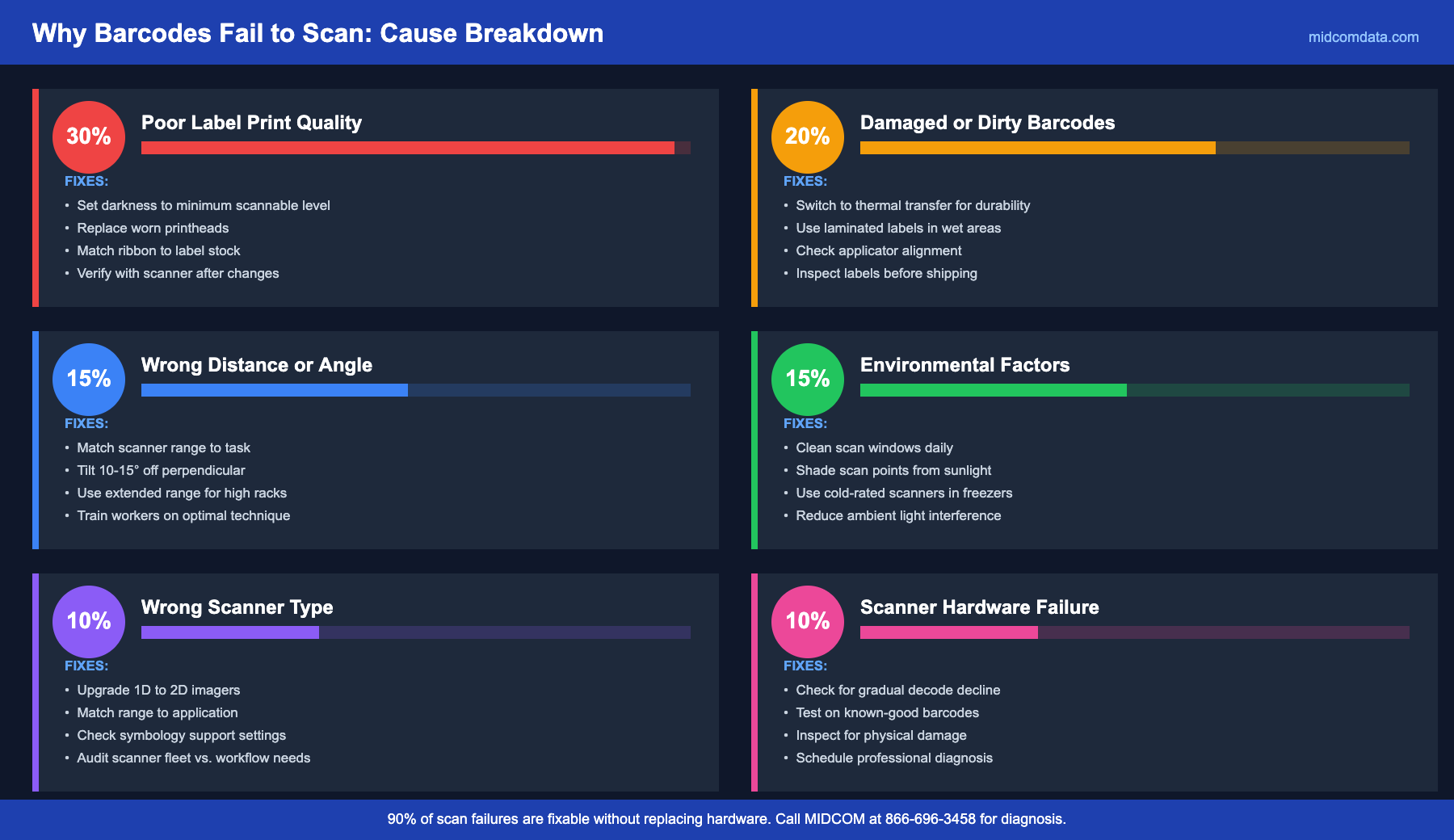
Cause 1: Poor Label Print Quality
This is the leading cause of scan failures, and it starts at the thermal printer, not the scanner. A barcode printed with insufficient contrast, uneven bar density, or voids from a worn printhead will fail to decode reliably, especially at the scanning speeds and distances typical in a busy warehouse.
The specific print quality issues that cause no-reads:
Darkness set too low. Bars are too light, reducing the contrast ratio between the bars and spaces. The scanner’s decoder needs a minimum contrast to reliably distinguish bar edges. A barcode that appears “readable” to your eye at close range may fail a scanner reading from 12 inches away at an angle.
Darkness set too high. Bars bleed into the spaces between them, making narrow bars wider than their specification. This is called “bar gain” and it corrupts the encoded data. It also smears into the quiet zone (the blank margin at each end of the barcode), which some decoders require for reliable reading.
Printhead element failure. Dead elements in the printhead produce white vertical lines through the barcode. Even a single void through a narrow bar can make it unreadable. If cleaning the printhead with isopropyl alcohol does not eliminate the lines, the printhead needs replacing.
The fix is at the printer. Set the darkness to the minimum level that produces a solid, high-contrast barcode and verify with a scanner (or ideally a verifier) after any printhead, ribbon, or media change. For help dialing in printer settings, MIDCOM’s on-site technicians can calibrate your printers and verify output quality during a single visit.
Cause 2: Damaged, Dirty, or Wrinkled Barcodes
A barcode that was printed perfectly can become unreadable before it reaches the scanner. Common culprits:
Abrasion during transit. Labels on cartons rub against conveyor belts, other cartons, and handling equipment. Direct thermal labels (the kind printed without ribbon) are particularly susceptible to this because the thermal coating scratches off with friction. If your labels get rough handling between printing and scanning, thermal transfer labels with a wax-resin ribbon are more durable.
Moisture and condensation. Warehouses with cold storage zones or dock doors that open to humid outside air create condensation on label surfaces. Water droplets on a barcode scatter the scanner’s light beam and cause partial or total decode failures. Laminated labels or a clear overcoat on the label stock prevents this.
Label wrinkles and bubbles. A label that is not pressed flat onto the product or carton — especially around curved surfaces — distorts the bar widths when viewed at an angle. Wrinkled labels are a common problem with automatic applicator machines that need adjustment or with adhesive that does not bond well to the specific packaging surface.
Cause 3: Wrong Scanning Distance or Angle
Every barcode scanner has an optimal reading range defined by its optics. A standard-range imager typically reads from 1 inch to 18 inches. An extended-range model reads from 6 inches to 30 feet or more. Using a scanner outside its working range produces weak or no decode.
Angle matters too. Laser scanners are sensitive to specular reflection (the scanner’s own beam bouncing straight back into the detector) when aimed perpendicular to a glossy label. Tilting the scanner 10 to 15 degrees off perpendicular avoids this. Imager-based scanners (area imagers) are less sensitive to angle, which is one reason they have largely replaced laser scanners in warehouse applications.
If your operation requires scanning at long distances (reading pallet labels high on racking, for example), a standard-range scanner will not work. You need an extended-range model like the Zebra DS3678-ER or the Honeywell Granit 1990i, which read from inches to over 30 feet. MIDCOM’s scanner catalog includes models for every range requirement.
Cause 4: Environmental Factors
The physical environment around the scanner matters more than you would think.
Ambient light. Direct sunlight on a barcode — common near dock doors and skylights — can overwhelm the scanner’s sensor, especially on older laser models. CCD and 2D imager scanners handle ambient light better, but even they struggle if the label surface creates a glare from direct sun. Repositioning the scan point or adding a shade over the scanning station solves this without replacing hardware.
Dirty scanner windows. The scan window on a barcode scanner collects dust, adhesive residue (from scanning labels in a labeling area), and general warehouse grime. A dirty window diffuses the light beam and reduces decode range and reliability. A daily wipe with a lint-free cloth and glass cleaner takes five seconds and prevents a gradual decline in scan performance that workers adapt to without reporting.
Temperature extremes. In cold storage (freezer) environments below 0°F, some scanners experience slower decode times and reduced battery life. Use scanner models rated for cold storage operation — the Zebra DS3678-SR is rated to -22°F. Standard warehouse scanners are not designed for sustained sub-zero use and will fail prematurely.
Cause 5: Wrong Scanner for the Application
A 1D laser scanner cannot read a QR code. A standard-range imager cannot read a barcode at 15 feet. A corded scanner tethered to a fixed workstation cannot follow a worker into the rack aisles. These seem obvious, but mismatched scanners are common in operations that have grown or changed their workflows without updating equipment.
The most frequent mismatch we see is operations that have started using 2D barcodes (QR codes, Data Matrix, or PDF417 on shipping manifests) but are still using 1D laser scanners. The scanner physically cannot read the barcode format, and the worker assumes the barcode is bad or the scanner is broken. An upgrade to a 2D area imager solves the problem immediately.
Cause 6: Actual Scanner Hardware Failure
Sometimes the scanner really is broken. The scan engine degrades over time, especially in high-drop and high-vibration environments. A scanner that has been dropped 50+ times may have a cracked lens element, a misaligned imager, or a damaged cable connector (on corded models) that causes intermittent failures.
Signs the scanner itself is failing: decode performance has degraded gradually over weeks, the scanner fails to read barcodes it could read easily six months ago, or the scanner makes a successful decode beep inconsistently even on clean, high-quality barcodes. If cleaning the window and verifying the barcode quality does not help, the scanner needs professional diagnosis. MIDCOM’s express repair depot can turn around scanner repairs quickly, and the buyback program gives you credit toward a replacement if repair does not make financial sense.
Frequently Asked Questions
What is a normal barcode scan failure rate?
A well-configured scanning operation using quality labels and properly maintained scanners should see a first-pass read rate of 98% or higher. If your failure rate exceeds 2 to 3%, there is a correctable problem with print quality, scanner selection, or environmental factors. Track your failure rate by station or zone to identify whether the issue is systemic or localized.
Why does my barcode scanner read some barcodes but not others?
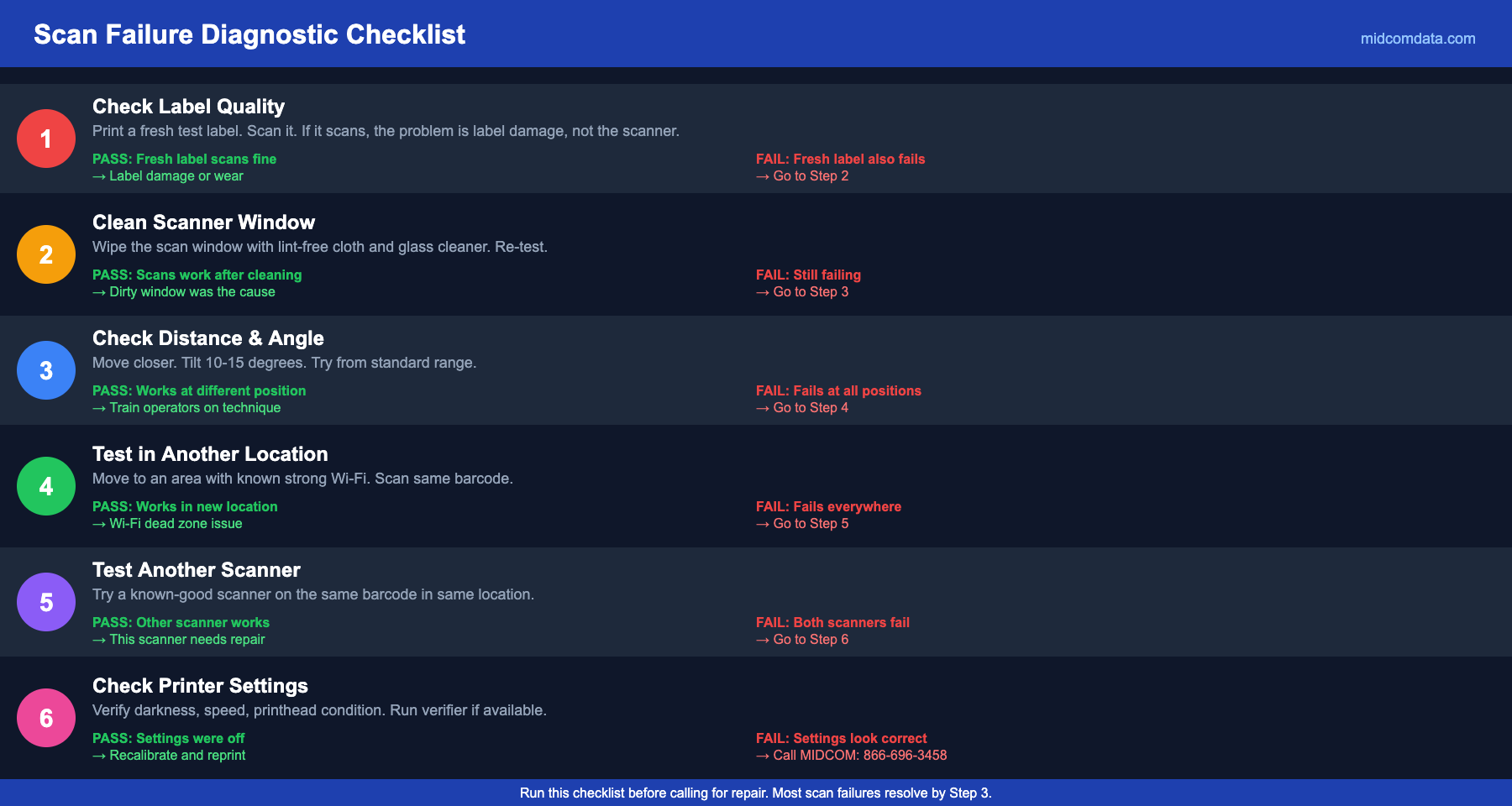
The most likely reasons are: inconsistent print quality (some labels are printed darker or lighter than others due to printhead wear or darkness variation), different barcode symbologies (your scanner may be configured to read Code 128 but not QR codes), or damage on specific labels. Try the failing barcode on a known-good scanner. If it reads there, the problem is your scanner’s configuration or hardware. If it fails on both, the label is the problem.
How often should barcode scanners be cleaned?
Wipe the scan window daily with a lint-free cloth. In dusty environments or areas with adhesive residue (labeling stations, packing lines), clean the window at every shift change. The scan window is the only part of the scanner that affects read performance when dirty. The rest of the housing is cosmetic. Five seconds of daily cleaning prevents weeks of gradually degrading scan rates that nobody notices until productivity numbers drop.
Can barcode size affect scan reliability?
Yes. Every barcode symbology has a minimum size (determined by the X-dimension — the width of the narrowest bar). Printing a barcode too small for the symbology or too small for the scanner’s resolution results in unreliable reads. A standard-resolution scanner (typically reads down to a 5 mil X-dimension) cannot reliably decode a barcode printed at 3 mil. If you are shrinking barcodes to fit on smaller labels, verify that your scanner can read the minimum X-dimension you are printing.
Should I upgrade from laser scanners to imagers?
If you are still running linear laser scanners, upgrading to 2D area imagers is worth the money. Imagers read both 1D and 2D barcodes, perform better on damaged or poorly printed labels, work at wider angles, and are less affected by ambient light. They also capture images that can be stored for audit purposes. The per-unit cost is comparable to modern laser scanners, so the barrier to switching is low. MIDCOM carries 2D imagers from Zebra and Honeywell at every price point.
Find and Fix the Root Cause
Scan failures are a symptom, not a diagnosis. Before replacing scanners, check your label quality, your scanner configuration, and your environment. Most scan failure problems go away with a printer calibration, a clean scanner window, or a settings tweak that costs nothing. For issues that run deeper, contact MIDCOM Data Technologies at 866-696-3458. We will figure out what is actually causing the failures and fix the right thing.