
Choosing The Right Rugged Mobile Computer For The Warehouse
How to Choose a Rugged Mobile Computer for Your Warehouse
When a Handheld Scanner Is Not Enough
A rugged mobile computer replaces multiple devices with one: barcode scanner, touchscreen terminal, and wireless data connection in a single handheld unit. Warehouse operations that outgrow standalone scanners — because workers need to look up inventory, confirm picks on screen, or capture signatures — typically move to rugged mobile computers as the next step. Choosing the wrong one means devices that break too fast, batteries that die mid-shift, or screens that workers cannot read in bright or dim conditions.
MIDCOM Data Technologies supplies and services rugged mobile computers from Zebra, Honeywell, and other major manufacturers for warehouse, logistics, and manufacturing operations across the U.S. and Canada. What follows is based on what we see working and failing in the field.
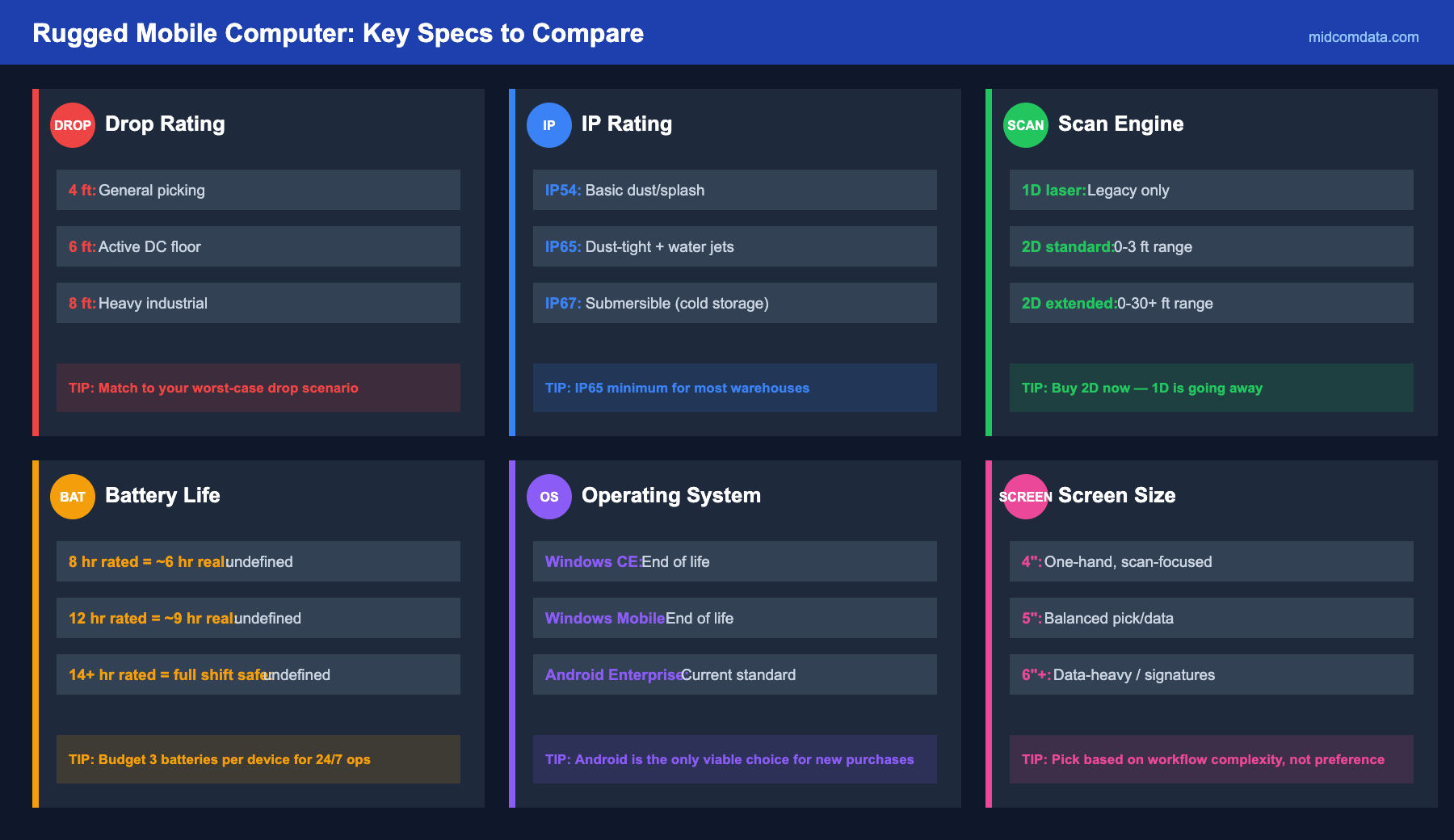
Durability: Drop Rating and IP Rating
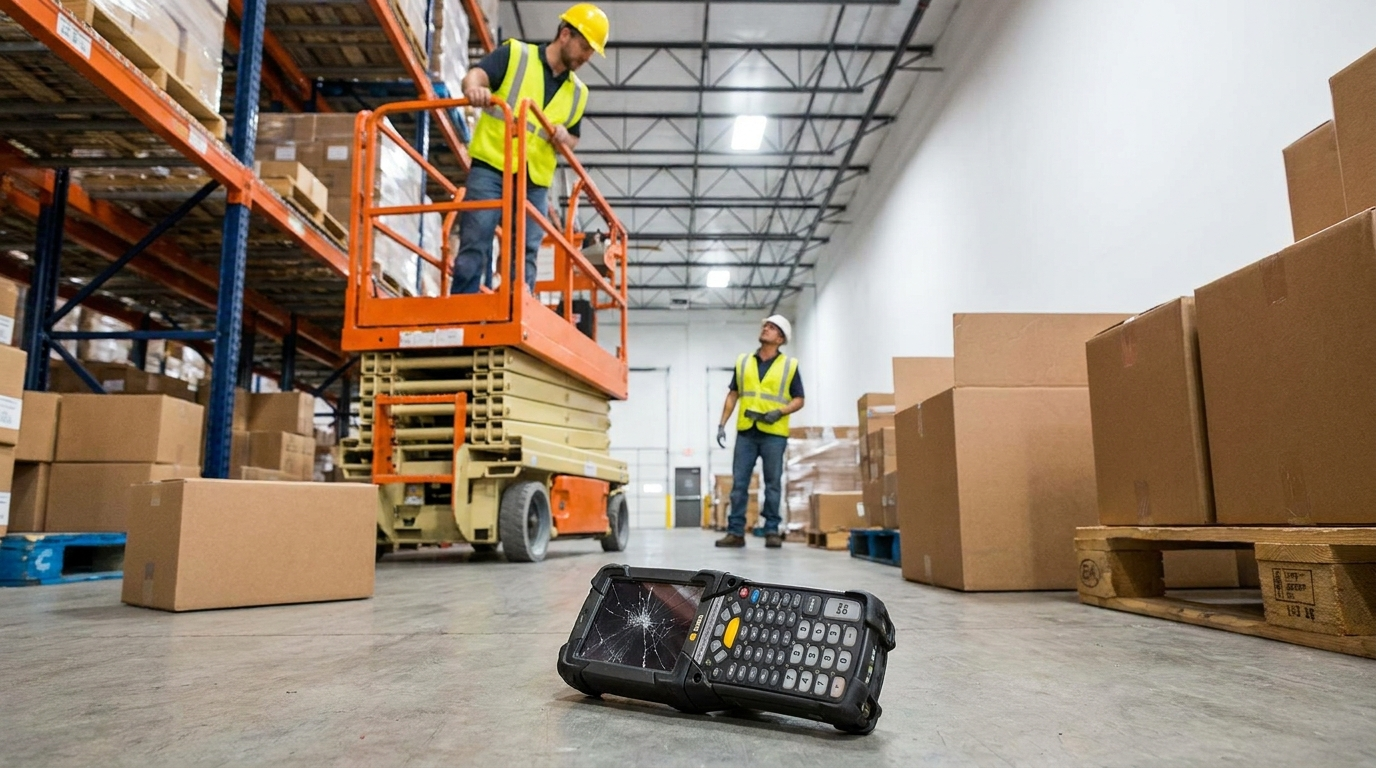
Warehouse floors are hard concrete, and devices get dropped. Frequently. A consumer-grade tablet or phone will crack its screen the first week. Rugged mobile computers are rated for repeated drops using the MIL-STD-810G standard (or the newer 810H). The rating tells you how many times the device can survive a drop from a specified height onto concrete.
For general warehouse picking, a device rated for 4-foot drops onto concrete is the minimum. For distribution centers with high racking and forklift operations, look for 6-foot or 8-foot drop specs. The Zebra MC9300, for example, is rated for drops up to 8 feet onto concrete and handles the kind of punishment a busy DC dishes out daily.
IP (Ingress Protection) rating tells you how well the device resists dust and water. IP65 means total dust protection and protection against water jets from any direction — sufficient for most indoor warehouses. IP67 adds submersion protection, which matters in food processing, cold storage, or any environment with washdown procedures. If your operation hoses down equipment or works near open water, do not go below IP67.
Scanning Engine: What Your Barcodes Demand
The scanning engine built into a mobile computer matters as much as the device itself. Ask yourself three things:
1D or 2D? If you scan any QR codes, Data Matrix codes, or PDF417 codes (common on driver’s licenses and shipping manifests), you need a 2D imager. Even if your current workflow is 1D only, buy 2D. GS1’s 2027 sunrise date means 2D barcodes are coming to more supply chain applications, and a scanner purchased today should last 4+ years. Saving $50 per device on a 1D-only engine is a poor tradeoff against obsolescence in two years.
Standard range or extended range? Standard range engines read from contact distance to about 3 feet — fine for picking from shelf-level bins. Extended range (or long range) engines read from 6 inches to 30+ feet, which is necessary for scanning labels on upper rack levels or pallet locations 20 feet up without a forklift. The Zebra SE4750 and Honeywell N6803 are popular extended-range engines in current mobile computers.
Damaged or dirty barcodes? Warehouses that deal with printed labels that smudge, wrinkle, or partially tear need an engine with aggressive decode algorithms. Honeywell’s Adaptus technology and Zebra’s PRZM Intelligent Imaging are designed to read barcodes that cheaper engines cannot.
Battery Life: Getting Through a Full Shift
A mobile computer that dies at hour six of an eight-hour shift is a problem. Workers either stop to charge or swap batteries, and both eat into the shift.
Look for devices with rated battery life that exceeds your longest shift by at least 25%. Manufacturer battery specs assume moderate use — real warehouse scanning with constant screen use, Wi-Fi connectivity, and frequent barcode reads drains faster than the spec sheet suggests. A device rated for 14 hours of typical use will realistically get 10 to 11 hours in a demanding picking operation.
Hot-swappable batteries let workers swap a depleted battery for a fresh one without powering down the device. This is not a nice-to-have in operations running multiple shifts — it is a requirement. A charging cradle that holds 4 to 8 spare batteries per shift keeps devices rotating without interruption. If your operation runs 24/7, budget for three batteries per device: one in the device, one charging, and one ready.
Operating System: Android Is the Standard
Windows CE and Windows Mobile are end-of-life. Microsoft stopped issuing security patches, and most device manufacturers have discontinued Windows-based models. If your operation is still running Windows mobile computers, moving to Android is not optional, just a matter of timing.
Android (specifically Android Enterprise with Google Mobile Services) is the industry standard for new rugged mobile computers. Zebra’s entire current lineup runs Android, as do Honeywell’s CT45, CT60, and CK65 series. The advantages over Windows CE include a modern app ecosystem, better security update support, and a user interface that workers already know from their personal phones.
The migration cost is mainly in software. If your WMS or inventory application was built for Windows CE, it will need to be rewritten or replaced for Android. Some WMS vendors (SAP, Blue Yonder, Manhattan Associates) offer Android-native clients. If your operation uses a legacy Windows CE application from a smaller vendor, talk to them about Android compatibility before purchasing new hardware. MIDCOM’s rugged mobile device catalog includes current Android models from Zebra and Honeywell with guidance on compatibility.
Screen Size and Usability
Screen size is a balance between readability and carry weight. A 4-inch screen fits comfortably in one hand and slides into a holster, but displaying a pick list with item descriptions, locations, and quantities gets cramped. A 5- or 6-inch screen gives workers more information at a glance but adds weight and bulk.
For standard pick/pack/ship workflows where workers view one task at a time, 4 to 4.3 inches is sufficient. For more complex workflows — cycle counting with detailed item info, receiving with multi-field data entry, or proof-of-delivery with customer signatures — a 5-inch or larger screen reduces errors and frustration.
Screen brightness matters too. A warehouse with skylights, open dock doors, and varying light conditions needs a display rated at 500 nits or higher to remain readable in direct sunlight. Cold storage operations need a screen that works with gloved hands — look for capacitive touchscreens with configurable touch sensitivity or support for stylus input.
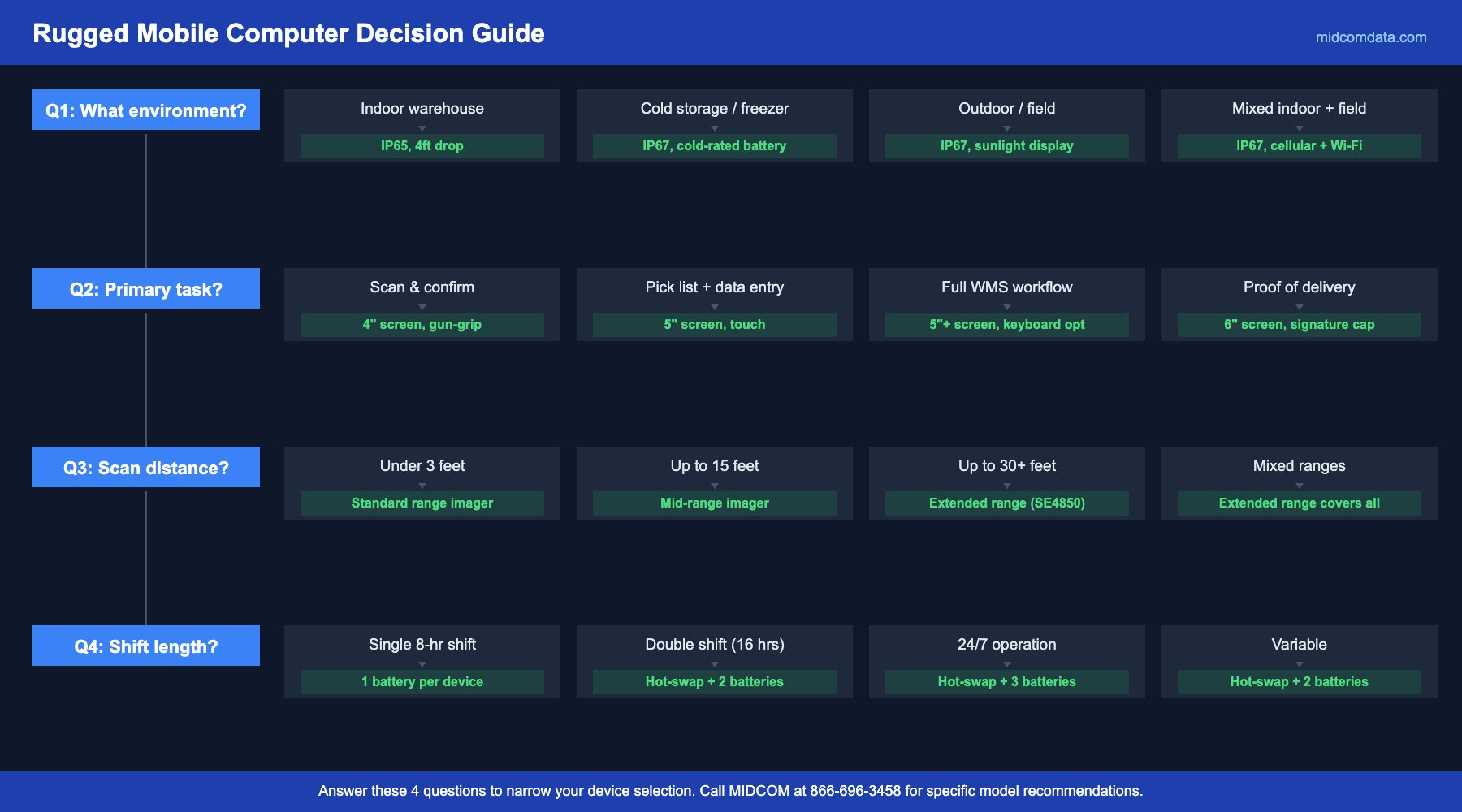
Connectivity: Wi-Fi, Cellular, or Both
Most warehouse mobile computers connect via Wi-Fi (802.11ac or Wi-Fi 6). This works well in facilities with good wireless infrastructure coverage. If your warehouse has Wi-Fi dead zones — and many do, especially in areas with dense metal racking — you will see scan submission failures and frustrated workers. (For more on diagnosing Wi-Fi problems, see our post on how Wi-Fi dead zones affect scanner productivity.)
For field operations (delivery drivers, service technicians, route sales), cellular connectivity (4G LTE or 5G) is necessary. Some devices offer both Wi-Fi and cellular in one unit, which is useful for operations that span a warehouse floor and a delivery route.
Total Cost Beyond the Device
The purchase price of a rugged mobile computer runs $1,500 to $3,500 depending on specifications. But that is just the hardware. Add in protective cases, holsters or belt clips, charging cradles (single-slot and multi-slot), spare batteries, screen protectors, and any mounting hardware for vehicle-mount applications.
Also budget for device management. Zebra’s LifeGuard for Android provides extended security updates beyond the standard Android support window. Honeywell’s Mobility Edge platform offers a similar multi-generation update commitment. These programs cost money but keep your devices secure and supported for 5+ years instead of the standard 3.
A service contract covering your mobile computer fleet protects against repair costs from accidental damage, which will happen regardless of how rugged the device is. MIDCOM’s protection plans cover on-site service and repair for mobile computers alongside printers and scanners.
Frequently Asked Questions
What is the difference between a rugged mobile computer and a rugged tablet?
A rugged mobile computer is a handheld device (typically 4 to 5-inch screen) with an integrated barcode scanning engine, designed to be carried and operated with one hand. A rugged tablet has a larger screen (8 to 10 inches), is used for tasks requiring more screen space (like forklift-mounted applications, inventory audits, or proof of delivery with signatures), and usually requires an external Bluetooth scanner for barcode reading. Choose a mobile computer for scan-heavy workflows and a tablet for data-heavy workflows.
How long do rugged mobile computers last in a warehouse?
With proper care and a service plan, a rugged mobile computer from Zebra or Honeywell typically lasts 4 to 6 years in a warehouse environment. The battery will need replacing every 12 to 18 months, and the screen protector should be swapped as it gets scratched up. The main factors that shorten lifespan are physical abuse beyond the drop rating, exposure to liquids beyond the IP rating, and running outdated operating systems past the security support window.
Should I buy or lease rugged mobile computers?
Leasing spreads the cost and makes it easier to refresh devices on a regular cycle (typically every 3 years). Buying gives you ownership and flexibility but requires upfront capital and leaves you managing aging devices. For operations that need to stay current with Android updates and security patches, a 3-year lease with device refresh often makes more financial sense than buying and running devices until they fail.
What accessories do I need for each device?
At minimum: a protective boot or case, a screen protector, one spare battery per device, a multi-slot charging cradle (one for every 4 devices), and a holster or belt clip. For forklift applications, add a vehicle-mount cradle with a power connection. For cold storage, add a hand strap (workers wearing thick gloves drop devices more frequently) and consider a heated charging station since lithium-ion batteries charge poorly below freezing.
Can MIDCOM help with device selection and setup?
Yes. MIDCOM Data Technologies supplies rugged mobile computers from Zebra, Honeywell, and other manufacturers. Our team can recommend the right device for your environment, configure devices with your WMS software before shipping, and set up ongoing service coverage. Call 866-696-3458 or contact us online to discuss your requirements.
Pick the Right Tool for the Job
A rugged mobile computer is not cheap on a per-unit basis, but the right device matched to your workflow earns its cost back quickly in fewer breakdowns and faster picks. Start by defining what your workers actually need to do with the device — scan, view, enter data, capture signatures — and let that list drive the spec sheet. For help evaluating options, contact MIDCOM at 866-696-3458. We will match you with a device that fits your operation and your budget.