
Why Barcodes Labels Fade and How To Fix It
Why Barcode Labels Fade and How to Fix It
Why your barcode labels are fading
Barcode labels fade when the printed image degrades from heat exposure, UV light, chemical contact, abrasion, or using the wrong print method for the application. A faded barcode means scan failures, mis-picks, lost shipments, and compliance violations — all because the label can’t do the one job it was designed for.
Heat exposure: the most common cause
Heat kills more barcode labels than anything else, especially direct thermal labels. Direct thermal media is chemically treated to darken when heated — that’s how the printer creates the image. The problem is that any heat source, not just the printhead, triggers the same reaction. A pallet sitting on a loading dock at 110°F, a shipping container in the summer sun, or a product stored near a heat vent will darken the entire label surface, turning your crisp barcode into a gray smear.
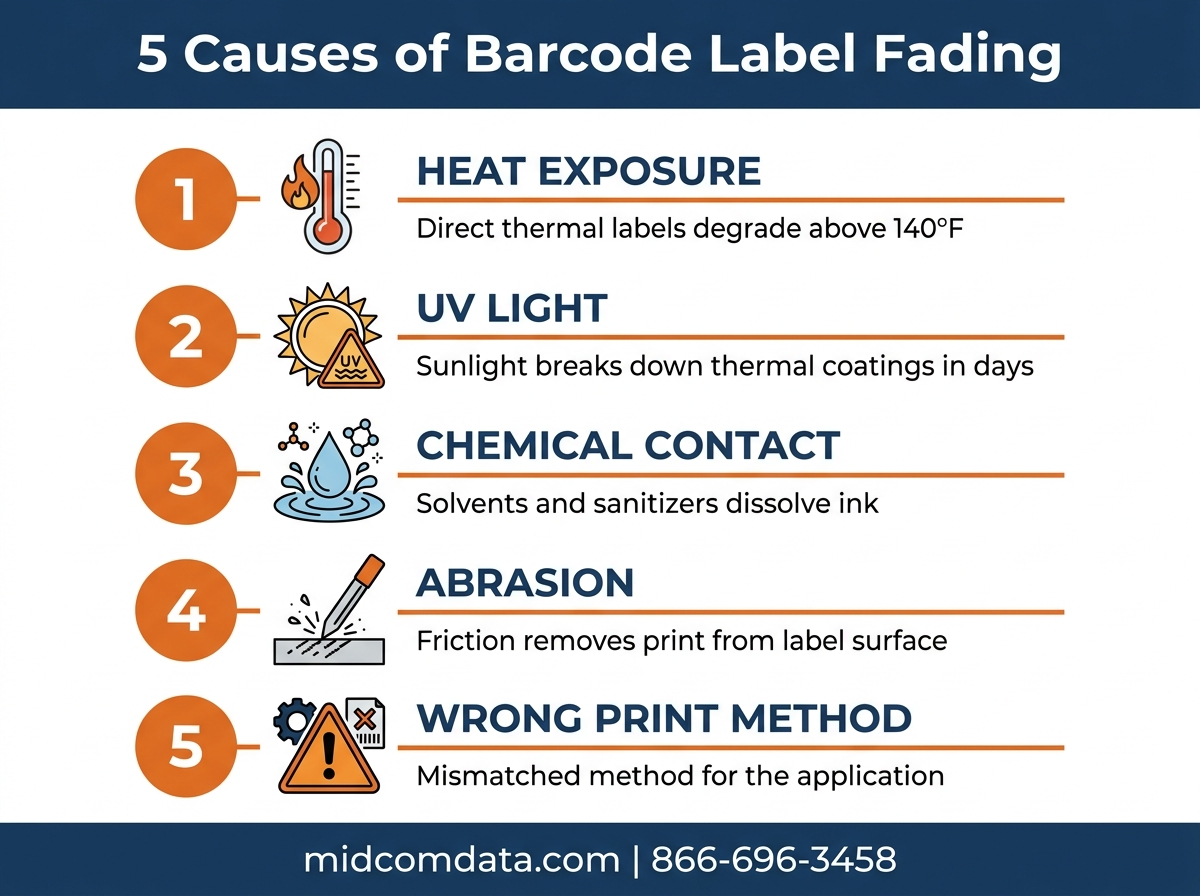
Direct thermal labels start losing contrast at temperatures above 140°F (60°C). At sustained temperatures above 160°F, the label background darkens to the point where there’s not enough contrast between bars and spaces for a scanner to decode the barcode. You don’t even need extreme heat — a label on a product sitting in a parked delivery truck for four hours on a July afternoon can degrade enough to cause scan failures at the receiving dock.
The fix depends on where the heat exposure happens. If labels are degrading during transit or storage, switch to thermal transfer printing for those labels. Thermal transfer images are ink-bonded to the label surface and don’t react to ambient heat. If switching print methods isn’t an option, use a direct thermal media rated for higher temperatures — some manufacturers offer “extended life” direct thermal stocks that tolerate up to 175°F.
UV light and sun exposure
Ultraviolet light breaks down the chemical coating on direct thermal labels and fades the ink on thermal transfer labels over time. Direct thermal is far more sensitive — labels exposed to direct sunlight can start fading within days. Thermal transfer labels hold up better, but even they lose contrast after months of continuous UV exposure.
If your labels spend time outdoors or near windows, you have a few options. For direct thermal applications, move to thermal transfer with a wax-resin or resin ribbon — the transferred ink resists UV much better than chemically-reactive media. For thermal transfer labels that still fade in prolonged sun exposure, switch to a synthetic label stock (polyester or polypropylene) with a resin ribbon. These combinations survive years of outdoor exposure.
Over-lamination is another option. A clear laminate layer over the printed label blocks UV and adds abrasion resistance. It adds cost (roughly 1 to 3 cents per label), but for high-value product labels or asset tags that need to last years, it’s worth it.
Chemical contact and moisture
Chemicals that touch the label surface can dissolve ink, react with thermal coatings, or degrade adhesive. In food processing, cleaning solutions like quaternary ammonium compounds and bleach-based sanitizers attack standard paper labels. In manufacturing, solvents, oils, and hydraulic fluid break down both the print and the label material.
Moisture alone is enough to damage standard paper labels. A paper label in a walk-in cooler develops condensation during temperature transitions, and repeated wet-dry cycles wrinkle the face stock and smear the barcode. In freezer applications, frost buildup physically obscures the barcode even if the print itself is intact.
The solution for chemical and moisture exposure is synthetic label stock. Polyester labels with resin ribbon thermal transfer printing resist most industrial chemicals, won’t absorb moisture, and maintain print quality through repeated washdown cycles. For freezer applications specifically, use a freezer-grade adhesive rated to -40°F — standard adhesive loses tack in the cold and the label falls off entirely, which is worse than fading.
Abrasion and physical wear
Labels that get rubbed, scratched, or handled repeatedly lose print density at the contact points. Shipping labels that slide against other packages during transit, product labels that customers handle before purchase, and rack labels that get bumped by forklifts all experience abrasion-related fading.
Direct thermal labels are more susceptible to abrasion fading because the image is on the surface of the label — any friction that removes the chemical coating removes the print. Thermal transfer labels have ink bonded to the surface, which resists light abrasion but can still scratch off with aggressive friction, especially with wax ribbon prints.
For abrasion-prone applications, use thermal transfer with a wax-resin or resin ribbon. Resin produces the most scratch-resistant print. Over-lamination adds another layer of physical protection for labels in high-abrasion environments. If your labels need to survive being dragged across a concrete floor or scanned through a powered conveyor system, lamination is cheap insurance.
Wrong print method for the application
Sometimes labels fade not because of an environmental factor but because the print method was wrong from the start. Using direct thermal labels for a product that ships cross-country in an unrefrigerated truck, sits in a distribution center for three months, and then goes on a retail shelf is asking for faded barcodes. That label needed thermal transfer from the beginning.
The reverse mistake is less common but still happens: using expensive resin thermal transfer labels for shipping documents that get scanned once at the dock and thrown away. You’re not wasting money on fading — you’re wasting money on durability you don’t need.
Match your print method to the label lifecycle. If you’re not sure which method is right for a specific application, contact MIDCOM Data Technologies. Our team can evaluate your labeling requirements and recommend the right combination of print method, label stock, and ribbon to eliminate fading. Call 866-696-3458 for a consultation.
Printer calibration issues that mimic fading
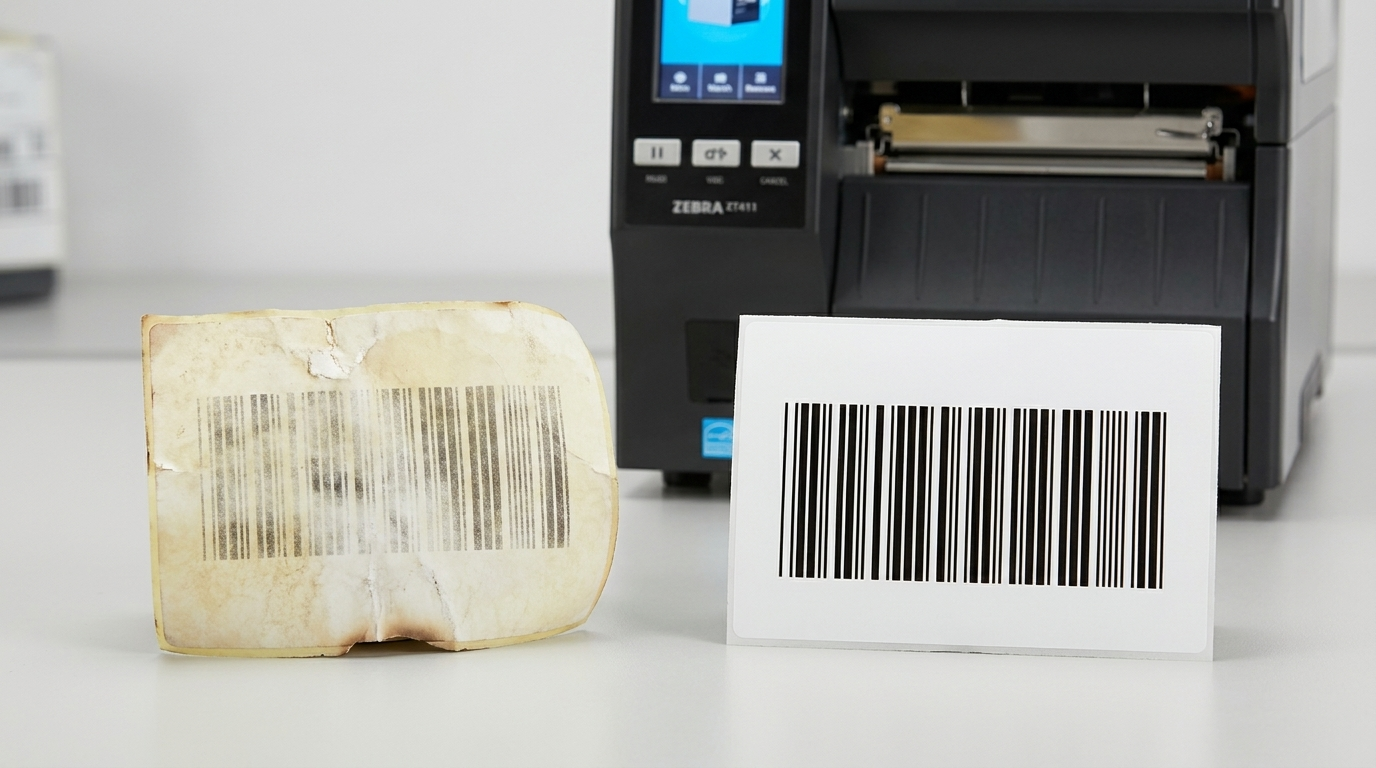
Not all “faded” barcodes are actually fading. Some are printed poorly from the start because the printer isn’t calibrated correctly.
Darkness set too low
If the printhead darkness (also called burn temperature or heat setting) is too low, labels come out of the printer with light, low-contrast barcodes that look like they’ve already faded. Bump the darkness up one or two increments and print a test label. If the barcode looks better, your labels weren’t fading — they were under-printed.
Print speed too high
Faster print speed means less heat exposure time per dot. At high speeds, the printhead may not transfer enough ink (thermal transfer) or generate enough chemical reaction (direct thermal) to produce a dense, readable barcode. If your barcodes look faint at 8 inches per second, try dropping to 6 and compare the output.
Worn printhead
A worn printhead produces inconsistent print density — some dots fire at full strength while damaged ones barely heat up. The result is a barcode with streaks, gaps, or uneven bars that looks faded but is actually a hardware problem. If cleaning the printhead doesn’t fix it, it’s time for a printhead replacement. A printhead past its rated lifespan (typically 1 to 4 million linear inches depending on the model and print method) produces progressively worse output.
MIDCOM Data Technologies provides on-site printer repair and express depot repair across the U.S. and Canada. If your labels are coming out faded and you can’t pinpoint the cause, our technicians can diagnose whether it’s a calibration issue, a worn printhead, or a media mismatch.
Preventing label fading: a quick reference
The core principle: match your label materials and print method to the worst conditions the label will face during its useful life.
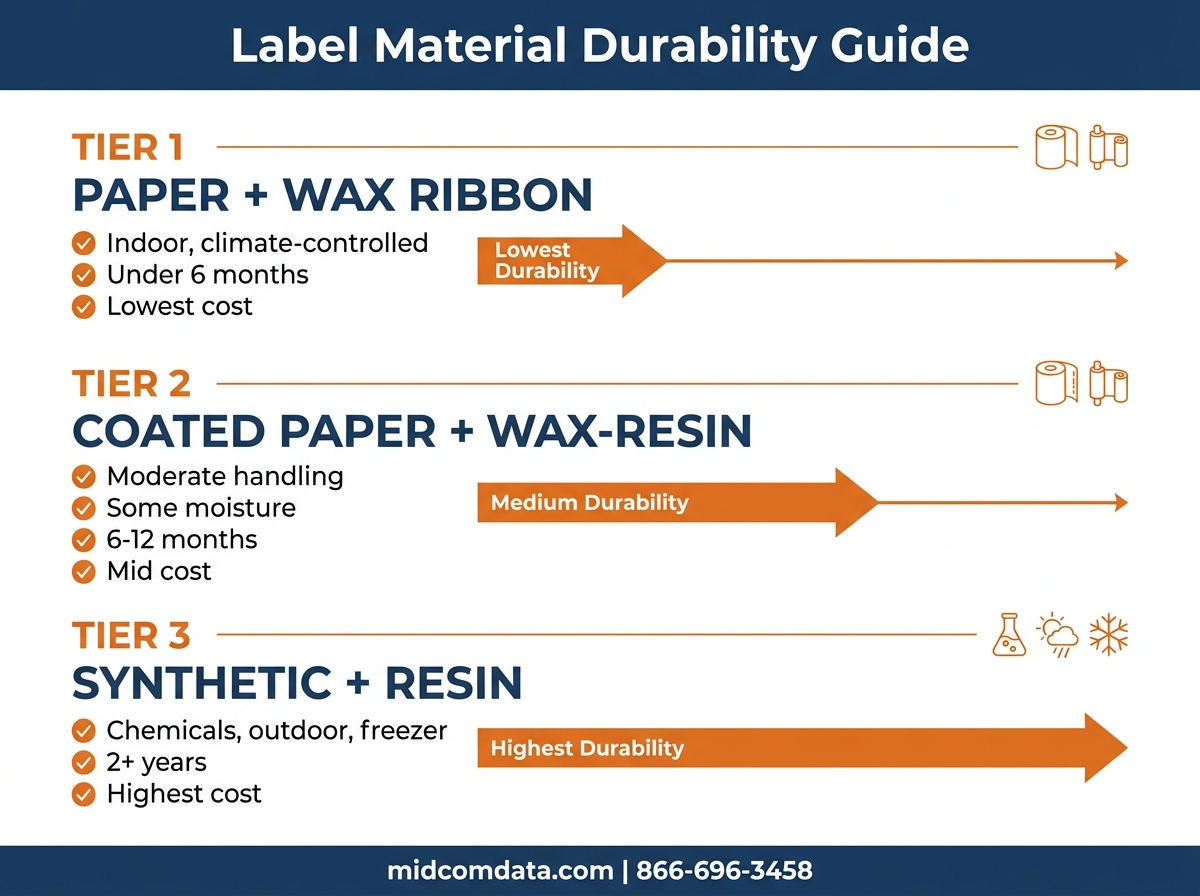
For indoor, climate-controlled environments with labels lasting under 6 months, direct thermal on standard paper stock works fine. For anything exposed to heat, sunlight, moisture, chemicals, or physical abrasion, switch to thermal transfer on appropriate label stock. Use wax ribbon for basic paper labels in mild environments, wax-resin for moderate durability needs, and resin on synthetic stock for the harshest conditions.
If you’re experiencing barcode scan failures and suspect label fading, start by checking your printer calibration (darkness, speed, printhead condition) before changing your media. A $2 printhead cleaning solves the problem more often than a $500 media upgrade. For labels that genuinely fade from environmental exposure, upgrading your print method and label stock eliminates the root cause.
If you’re stuck on label quality issues, MIDCOM Data Technologies has over 3,000 technicians across the U.S. and Canada who specialize in thermal printer service and consumable selection. Request a quote or call 866-696-3458.
Frequently asked questions
Why are my barcode labels turning dark or black?
Darkened labels are a sign of heat exposure on direct thermal media. The chemical coating reacts to ambient heat the same way it reacts to the printhead. The entire label surface darkens, reducing contrast with the printed barcode. Switch to thermal transfer printing to eliminate heat sensitivity.
Can I make direct thermal labels last longer?
You can extend direct thermal label life by storing labeled products in climate-controlled environments (below 77°F), away from direct sunlight and heat sources. Some manufacturers offer “extended life” direct thermal media that resists fading better than standard stock, rated for up to 175°F. But for any application requiring more than 6 months of readability, thermal transfer is the more reliable option.
How do I know if my labels are fading or my printer is miscalibrated?
Print a fresh label and compare it to the faded one. If the fresh label looks equally light, your printer needs calibration — increase the darkness setting, reduce speed, or inspect the printhead for wear. If the fresh label prints crisp and dark but the older labels are faded, the labels are degrading from environmental exposure.
What label material resists chemicals and moisture?
Polyester (PET) and polypropylene labels printed with resin thermal transfer ribbon resist most industrial chemicals, moisture, and repeated washdown cycles. These synthetic labels cost more than paper (typically 3 to 5 times more per label) but hold up in food processing, chemical manufacturing, and outdoor applications.
Does over-lamination prevent barcode fading?
Over-lamination significantly reduces fading from UV exposure, abrasion, and light chemical contact. A clear laminate layer shields the printed barcode from environmental damage. It adds roughly 1 to 3 cents per label in cost and is a good investment for high-value product labels, asset tags, or any label that needs to last years.
To learn more about preventative maintenance for your thermal label printers, visit our Printer Service Contract that includes Printer Replacement Protection or call us at (800) 643-2664.
Do you have other questions? Fill out the form below and we’ll contact you within minutes. We are here to help!